- Type
- Audio Effect
- Author
- ithkaa
- Version
- 4.0
- License
- None
- Live version
- 10.1.30
- Max version
- 8.1.8
- Downloads
- 943
- Updated
- 2021-01-17
bve.automate is an Audio Effect for Ableton Live by ithkaa, distributed as freeware, with no license specified by the author. It targets Live 10.1.30 and Max 8.1.8. On maxforlive.com it has 943 downloads. First published 2020-12-24, last updated 2021-01-17. 9 user comments below.
New to Max for Live? Read what Audio Effects do, how device licenses work, how to install a device.
Description
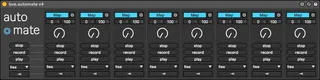
record and playback actions of any parameter in Live
quick start:
- hit "map" and select a parameter inside Live
- hit "record" and move the dial mapped to that parameter
- hit "play" to play the recorded value changes of the mapped parameter
→ set the "record mode" in the menu at the bottom. when the menu is set to anything else but "free", the transport must be activated. recording then starts according to the set record mode. playback starts automatically after the set recording period
→ play mode: select one-shot or looped playback
Comments (9)
This one is particularly cool !
I noticed few problems make it a bit annoying to use (and re-use):
- The undo history thing (each moves from bve.automate is repertoriated in the undo history of Live)
- I experienced few sync problems, I would love a sync button to synchronise, at least, with the Live transport (play/stop)
- A way to adjust amplitude and offset for each knob would be a super addition :)
IMHO it's a new device now, because of the "map" button instead of the "learn" one. Not a bad thing in some cases but the device acts in a very different way now.
What I found awesome in the previous version was, for exemple, the ability to learn freq and gain from an EQ8 band and move this band directly from the device. With this new version this became impossible...
Maybe you could make 2 differents devices with these 2 approaches since they act differently. I think both can be useful.
I hope you understand what I'm trying to explain, english is not my native language so I not sure i'm clear enough... sorry if i'm not !
Otherwise "undo history" problem is fixed now (really convenient ! :) ) and synchronisation is a nice add !
Again, thanks for your work !
I've tried looking inside the device and I can see that 'visible to mapping' is checked, but I can't see what more I'd need to do to make it visible to being controlled.