Mad Preset Launcher for Continuum and Osmose
The Mad Preset Launcher is a super easy-to-use Max For Live ...
- Type
- MIDI Effect
- Author
- randygeorge
- Version
- 1.2.4
- License
- AttributionNonCommercialNoDerivatives
- Live version
- 11.3.21
- Max version
- 8.5.6
- Downloads
- 281
- Updated
- 2024-11-02
Mad Preset Launcher for Continuum and Osmose is a MIDI Effect for Ableton Live by randygeorge, distributed as Creative Commons Attribution-NonCommercial-NoDerivatives. It targets Live 11.3.21 and Max 8.5.6. On maxforlive.com it has 281 downloads. First published 2021-01-29, last updated 2024-11-02. 12 user comments below.
New to Max for Live? Read what MIDI Effects do, what the AttributionNonCommercialNoDerivatives license means, how to install a device.
Description
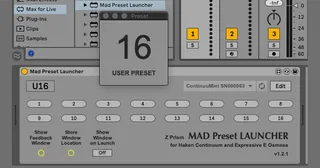
The Mad Preset Launcher is a super easy-to-use Max For Live utility for remotely launching presets on the Haken Slim Continuum, Continuum(w UM-ONE), ContinuuMini, EaganMatrix Module and Expressive E Osmose.
The latest version requires the connected instrument be updated with Haken Firmware version 9.9x or greater (including 10.0x).
The device features 16 slots which can be assigned to any user preset or factory default system preset in a connected instrument. By default, the 16 available slots are assigned to User Presets 1 to 16 on the connected instrument. To change the values click the EDIT button. In EDIT Mode, click and drag a preset slot to scroll through values, or click the up and down arrows to step through values.
If more than 16 preset assignments are needed, it is possible to chain together additional instances of MPL on the same MIDI Track. It’s even possible for different instances in the chain to be assigned to unique instruments. For example, connecting two Continuums, or a Continuum and Osmose to the system is possible within a chain of Mad Preset Launcher devices.
The preset slot triggers can be mapped to any external controller using the standard methods in Ableton Live.
In Edit Mode, Clicking the L button next to a preset slot will populate it with the preset currently loaded in the connected instrument. This is especially important for assigning system presets. (see notes below)
SETUP:
To perform standard Preset Launching on connected hardware, the connected device’s MIDI port needs to be enabled for Tracking MIDI Output in the MIDI Ports section of Ableton Live Preferences.
To use the Preset Learn Feature of MPL, The connected device’s MIDI port needs to be enabled for Tracking MIDI Input in the MIDI Ports section of Ableton Live Preferences.**
Important Notes:
Mad Preset Launcher is a Max For Live MIDI Device for use on a MIDI Track. In the Ableton Live Session, On device initialization, MIDI Routing for the track is automatically set to “No Input”. There is no need to setup MIDI Inputs and Output device on the MIDI Track. The M4L automates these parameters changes dynamically to prevent MIDI feedback loops in the connected hardware.
Preset slot assignments and instrument name is stored to the Ableton Live Session. Save the session to save changes in the device!
Older Continuums will require the Roland UM-ONE USB-Midi-interface in addition to Haken Firmware version 9.9x (compatibility for older Continuums still in development at the time of this writing).
Always ensure the Haken or Expressive E instrument is attached to the system before instantiating the Mad Preset Launcher max For Live Device.
Mad Preset Launcher will auto-detect any compatible devices and auto load if only one compatible device is connected. If there are two or more, the device will need to be selected from the device menu.
** It’s recommended to disable the MIDI Input port for the connected hardware when there is no need to use Preset Learn or after completing the programming for preset assignments.
Due to the variations in system presets across the compatible instrument, the system preset numbering scheme in Mad Preset Launcher does not align with the numbering scheme in the instrument. It is for this reason, MPL features the “preset learn” function.
NOTES for Expressive E OSMOSE:
In the MPL device on Mac systems, the selected MIDI port must be set to "Osmose Port 2". In current version 1.2.3 there is a communication issue preventing Macro Names (Custom preset parameters) from updating on the Osmose UI display when presets are changed using MPL. Also, the default preset selection of 1 to 16 corresponds to User Presets, not System Presets. To select System Presets, the "Preset Learn" function will need to be used to "capture" the currently loaded system preset and store the correct corresponding System Preset ID into the launch button.
Osmose connected to Ableton Live on Windows systems is not yet fully supported in MPL version 1.2.3. Support is coming is a future update.
Feedback Window:
The device also features a floating window to reflect the most recently triggered Preset and Preset type (USER or SYSTEM). The window can be set to appear automatically at Set launch time or can be opened manually.
It is possible to store the location of the Feedback Window with an Ableton Live session. Click the "Store Window Location" button and the next time the session is launched, the floating window will appear where ever it was saved last.
========
If you find this Max For Live device useful, please consider making a donation to support and sustain its development. Donation links are located inside the M4L device when in Edit Mode.
There are new features planned for future updates, including Preset name population, Instrument specific category numbering, and expanded detail in the Feedback Window, but this development will require more time and user support.
Comments (12)
The device is designed in such a way that output settings for the Ableton MIDI track (selected Haken/EE device + midi channel 16) get automatically SET and CLEARED every time a preset is triggered. This makes it possible to have multiple instances of MPL on a single track. It also allows each instance to be set to a unique Haken device or Osmose.
In the version 1.2.2 it is more obvious when output and channel routing is being automated if you look at the track I/O. In the previous versions, the Live API calls were triggered so fast that it was not providing any visual feedback.
Placing the External Instrument device after MPL is a nice solution in case there are routing issues. Good find.
https://randygeorgemusic.com/media/software/Mad-Preset-Launcher-v1.2.1.zip
If anyone is using v1.2.1 with the "External Instrument Device" workaround because MPL is unable to trigger from MIDI or keystrokes, I strongly recommend to NOT use "Preset Learn" OR disable Track Input for your Osmose or Haken Instrument. This will eliminate any possibility for MIDI Feedback loop through Mad Preset Launcher. MIDI feedback loops are one possible cause for preset data corruption in the Osmose and Haken Instruments.
Mad Preset Launcher now also works in Max 8. With a Max 8 license (and the ability to Save patches) you can open and use MPL in the same way as in Max For Live, plus store MIDI / keystroke mapping assignments to the device file for later recall.
I'm facing a Live crash on version 1.2.3 whenever I click on a preset.
If I edit with maxforlive and click the preset, I get the crash but the m4l editor stays open for exploration. I get a "sprintf: stack overflow" message. If I click at the message, it opens up a patcher [set] window that points to an object "sprintf set %s dictionary \$1". Any help would be very welcome! By the way, the patch looks awesome when unfrozen, good job! Here's a picture of the crash: https://ibb.co/pW7XDZX
It doesn't help...yet but thanks for trying!