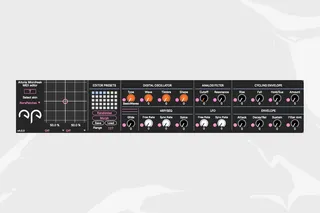
Arturia Microfreak MIDI editor
Arturia Microfreak Editor [version 5] version: 5.0.1 ...
- Type
- MIDI Effect
- Author
- NoraPatches
- Version
- 5.0.1
- License
- Commercial
- Live version
- 11.1.6
- Max version
- 8.3.3
- Downloads
- 0
- Updated
- 2023-07-06
Arturia Microfreak MIDI editor is a MIDI Effect for Ableton Live by NoraPatches, distributed as a commercial (paid) device. It targets Live 11.1.6 and Max 8.3.3. First published 2021-01-25, last updated 2023-07-06. 6 user comments below.
New to Max for Live? Read what MIDI Effects do, what the Commercial license means, how to install a device.
Description
Arturia Microfreak Editor [version 5]
version: 5.0.1
PDF manual accessible on product page.
This Max4Live MIDI effect is a comprehensive MIDI CC editor for the Arturia Microfreak with a built-in device updater, colour theme selector, randomiser and morphing engine as well as a dedicated XY control pad. The device sends and receives MIDI CC messages only. The device is built to directly pass all MIDI messages through as well, not to accidentally block the MIDI signal chain on the given track in Live.
PREREQUISITES:
Microfreak fw v4.0.1.1376 OR fw v5.0.0
Synth has to be in “Local Off” Mode*
Ableton Live 9/10/11 with Max4Live licence**
Internet connection (for updater only)
* Local mode OFF & Knobs send CCs ON [refer to Arturia User’s Manual page 90]
** Live 9/10/11 Suite OR any Live version + standalone Max license
How to use
The device should be placed on a MIDI track in Live. It’s up to you whether you want to manually configure the MIDI INs and OUTs on this track, then monitoring incoming audio on a new Audio Track
OR
with applying External Instrument on a MIDI track and configuring the incoming audio to be monitored.
All the GUI elements are MIDI mappable and automation enabled, so you can either draw in automation curves and envelopes or use other M4L devices and other modulation sources such as LFOs and Envelopes. This allows you to create previously unachievable sounds.
2023 NoraPatches
Comments (6)
Thank you for supporting my work!
Yeah, currently the device uses only [ctlin] and [ctlout] only, any other incoming MIDI is ignored.
I will introduce version 4 soon, I’ll fix this in that update :)
is there any news regarding the program change function?
is there a small manual for all functions?
what does the preset area do, for example?
I still have a problem.
if I draw an automation in the arrangement and then change the hardware manually, ableton does not show me this change.
With a plugin, the automation line turns gray and ableton indicates that I'm outside of the arrangement. I can then use the arrow in the transport area to jump back, unfortunately this is not possible with the editor.
then i still have the problem if i want to record the controller movements that i make by hand on the hardware, ableton records them in the arrangement and at the same time in the clip. So I have a double automation. is there a way to bypass this?
Thank you for your help!
First of all, thank you for supporting my work!
With kind feedback from a user, I’m currently working on implementing a solution where Local mode will have to be set to Off and the synth will be hooked up from/to Live like if it were a VST, this will enable us to overcome the automation issue you described. I only ask for a bit of patience, please, I’m working on multiple devices parallel at the moment, but I’ll try to hurry up with the update. Program Change messages should simply go theough with the latest version however.
A PDF manual is in-progress for all my past (and for the future) devices as well!
Nora