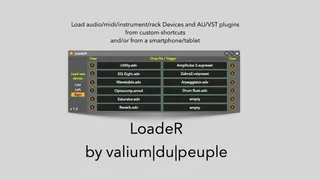
LoadeR - load devices with shortcuts
Ever wanted to quickly insert an Eq8, an Operator, an LFO or...
- Type
- Audio Effect
- Author
- Crampe
- Version
- 1.3
- License
- Commercial
- Live version
- 9
- Max version
- 8.1.5
- Downloads
- 0
- Updated
- 2024-06-04
LoadeR - load devices with shortcuts is an Audio Effect for Ableton Live by Crampe, distributed as a commercial (paid) device. It targets Live 9 and Max 8.1.5. First published 2021-06-18, last updated 2024-06-04. 46 user comments below.
New to Max for Live? Read what Audio Effects do, what the Commercial license means, how to install a device.
Description
Ever wanted to quickly insert an Eq8, an Operator, an LFO or even a VST from a keyboard shortcut, a midi controller, or even your smartphone/tablet thing? That's what LoadeR's for!
Unlike other similar M4L devices, you don't need any extra setup or script or grouping devices (ONLY vst2 need to be grouped/racked. Live can save Au and VST3 plugins as .aupreset/.vstpreset, which are files recognized by LoadeR.) to be able to quickly load your favorite devices into the selected track without ever opening Live's Browser... just press the shortcut you assigned to a device!
You can simultaneously use as many instances as you want, so you're not limited to the 12 slots of a single instance.
LoadeR also works with Mira/MiraWeb (with the included LoadeR Mira version) so you can use your touchscreen thing too!
Live9/10/11/12 with Max8 required.
Release notes:
v1.3 (sept. 2022):
Quick fix to adapt to some changes in Max8.3.2
v1.2: you can now choose where a device will be loaded in the chain relative to the currently selected device
v1.1: now m1 compatible
Comments (46)
It's mentionned in the video demo and in the manual, but it was missing from the device's page, and it's now fixed, thanks!
ONLY vst2 need to be grouped/racked.
Live can save Au and VST3 plugins as .aupreset/.vstpreset, which are files recognized by LoadeR.
Seem to be getting a duplicate device when clicking on a slot.
Cheer for the device.
That's either because you've tried using multiple instances of the free Lite version,
OR
because you're clicking the slots with the mouse which is not what the device is intent for!
It's specifically designed to work with shortcuts, and since buttons in M4L have never been made to be used as shortcuts it needs workarounds... which interfere with mouse clicking.
Cheers :)
You gave me the idea of making a floating window version, that you could keep around all the time and use with the mouse.
But, hey shortcuts are queens!
also - you mentioned 'other similar m4l devices'. which ones are those? im looking for something like this for an older 32bit laptop (but still super capable) laptop - live 9/max7.
Sure, hack it, it's M4L!
LoadeR definitely works on L9 (64bit)/Max8, but no idea about Live 32bit, did you try already?
For other similar devices, you can check Flowstate's Browser Mapper or Shortcut Buddy (from Noir Labs I think) but no idea if those can run on Live 32bit either.
I am using the latest Ableton Beta atm and I'm wondering if there are any plans in the future for the plugin to be natively supported by the silicon chips.
I believe this would be absolutely wonderful and would love to recommend it to my group of friends if we get to see it working in the silicon versions of Live as well.
Kind regards
a silicon version will be released as soon as possible, but it's not totally up to me.
The sooner the better but atm I can't give any deadline.
However, I can't seem to figure out how to get a websocket address through LoadeR Mira (on Windows 10, Live 10/11, whereas I'm trying to use Touch Portal as a controller on my Android device). I've tried clicking on the "Get MiraWeb connection address" button several times and nothing shows up 🤔
Any help would be greatly appreciated! 🙏
Did you check LoadeR's user guide? There's a detailed explanation of how to set this up.
I was wondering if it can be easily possible de launch app (external apps or automator apps) from it ? I see when you drag an app on it (macOS) that the device save the path, but no launch...
by the way It is so useful for Ads/adv and also ".Als" files !!
Thank you
It's not the purpose of the device (and it's not going to be), but you're welcome experimenting with it ;-)
I found Just one bug.
It is impossible to load a midi clip on a channel, both .alc and .mid files in arrangement view. Clips are failed to load, nothing happens.
In Session mode alwys with midi clip new track will be created with drum rack.
Thank You!
Thanks !
The device has no option to swap a device (you can use Live's hotswap feature though).
It's not expected that a new device will be created and added both to the right AND the left side of the selected one...
Are you sure LoadeR is sitting in your Master track (or a dedicated "Utility" track)?
Are you sure you don't have multiple LoadeR instances which don't have the same "insert position" setting?
Love the device, but I am experiencing a weird issues. The left part of the device - the first 6 slots - are working as expected, but the right part is not working properly and the plugins/devices in the slots of the last six slots are not saved if I save it as a preset or have LoadeR in my default template.
If i fill up all the slots the ones on the left are working but the right are not, and if I press the edit-button it opens up in edit mode but the devices in the slots on the right side are not visible in the edit mode.
At the moment I just use the left side of two instances, but I'm wondering if there is a fix.
Thanks!
this just popped up for some users since the L11.2.10 update.
Which OS are you using?
The solution is to download the latest Max standalone on Cycling74's site, and then set is as your M4L "runtime" in Live's Preferences.
Sorry for the hassle, not my fault! 😉
no, you don't have anything else to buy,
read this article that'll explain more precisely the steps I described earlier:
https://help.ableton.com/hc/en-us/articles/209070309-Using-a-separate-Max-for-Live-installation
If those conditions are met, you can't load anything, regardless of if it is in LoadeR or not.
I can't reproduce, and it's actually the 1st time I'm hearing about such issue.
Are you on Win or OSX?
Could you contact me via email, so we can sort this out?
Just answer to your Gumroad receipt and it'll go straight to my emails.
Same issue here with the right slots not saving properly! Is there a known solution? Thanks.
Sure there's a solution, and it's provided 6 comments above ;-)
I'm copy/pasting:
"this just popped up for some users since the L11.2.10 update.
Which OS are you using?
The solution is to download the latest Max standalone on Cycling74's site, and then set is as your M4L "runtime" in Live's Preferences.
Sorry for the hassle, not my fault! ?"
But it's been fixed since then in Live because its bundled Max has been updated.
Just update your Live version to the latest one and you'll be fine (or follow the instructions above if for some reason you want to stick to an outdated Live version).
cheers
Sorry, I went through the posts too quickly! THANKS.
Will there be a fix ? I just can't work without this device. Thank you !
Everything is still working as expected here. I guess you'll have to question what changed on your system between now and 3 days ago as I'm unfortunately not equipped with a crystal bowl at the moment (I heard there's a shortage on the production line)
was small Windows 11 update, but i dont think its beacause of the updates. I have both Ableton versions 11 & 12 and on both are not working. Other M4L devices are working without issues. I dont know what could have happened.
Could you email me please, it'll be easier to communicate. It's really something on your end, I've not other report about this. Since you updated Windows, it's possible that you lost what's inside the device if you opened it up and unfrozen it at some point in the past. But let's email (you can find my email on your receipt)
Yeah, that's what the left/right/last selector is for, i.e to the left/right of the currently selected device, or last to always be inserted as the last device of the current chain.
Just answer to your gumroad receipt and it'll go straight to my inbox.
Thanks
AFAIK, with Shortcut Buddy you first need to save racked presets. This isn't the case with LoadeR.
Other than that, LoadeR is way cheaper.
Which Live version are you using?
Where are your .vstpresets are stored?