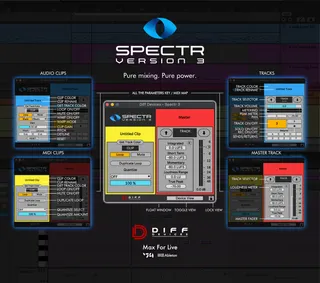
DIFF Devices - SPECTR
DIFF Devices - SPECTR 3 SPECTR 3 is a MaxForLive devi...
- Type
- Audio Effect
- Author
- DiffDevices
- Version
- 3.41.0
- License
- Commercial
- Live version
- 11.1
- Max version
- 8.2
- Downloads
- 0
- Updated
- 2024-05-17
DIFF Devices - SPECTR is an Audio Effect for Ableton Live by DiffDevices, distributed as a commercial (paid) device. It targets Live 11.1 and Max 8.2. First published 2022-01-12, last updated 2024-05-17. 17 user comments below.
New to Max for Live? Read what Audio Effects do, what the Commercial license means, how to install a device.
Description
DIFF Devices - SPECTR 3
SPECTR 3 is a MaxForLive device that give you total control of Ableton Live.
3.4 RELEASE NOTES:
- (NEW) Octave Up/Down Midi Clip
- Update Metering
- 50% Less CPU
- Bug Fixes
- No More Messing Undo History
3.3 RELEASE NOTES:
- (NEW) Bypass Master Devices
Note: Devices needs to be active before adding SPECTR 3 to your project.
- Fixed Track Name color
- Fixed color track chooser
- Fixed fader volume jumps to "-inf".
- Dark themes compatible
3.2 RELEASE NOTES:
- Mapping Mode Enabled again
- Reset Peak values fixed
- Lock button no longer jumps
- Fix a bug that could make ableton crash
- Other bug fixes
3.1 RELEASE NOTES:
- New Duplicate Loop (Midi Clips)
- New "get color from track" in clips.
- Bug fixes
3.0 FEATURES :
• GUI Redesign
• Key & Midi Mapping
• Toggle View (Device View / Clip View)
• Lock ( Locks the float window to your screen or remove title bar)
• Open the device by mouse position
• Track Parameters
- Track Selector
- Volume
- Pan
- Solo
- Mute
- Record
- Meter
- Peak Level
- Color Picker
- Track Rename
• Clip Parameters
- Color Picker
- Track Rename
- Loop On/Off Button
- Mute On/Off Button
- Quantize (Midi Clips Only)
- Warp On/Off (Audio Clips Only)
- Warp Mode Chooser (Audio Clips Only)
- Clip Gain (Audio Clips Only)
- Pitch & Detune (Audio Clips Only)
- Reset (Audio Clips Only)
• Master Track Parameters
- Volume Control
- Loudness Meters
Instalation Guide:
(Mac & Win)
- Save the .amxd file anywhere on your computer or in a folder that you previously saved your maxforlive devices.
Usage Guide:
- Simply drag the .amxd file as the last device in your MASTER Track.
- Map “Open” button to your keyboard and/or midi controller.
- Save as new template in Live’s preferences and you’re good to go.
- Totally recommend to map the “Open” button before you use “Lock”.
------------
* Only works in Ableton Live with Max installed.
* It Requires Ableton Live V11 (minimum).
MORE INFO : https://www.youtube.com/watch?v=mNR3WHdmhGY
Comments (17)
i have buy your device and several bug in it
browse you track with up and down change parameter of the track (level of track)
And the renaming doesn't work for all the track ...
Thanks
Thanks for your work
1. Clicking a parameter in the Spectr window while in MIDI CC mapping mode does not register.
2. After several attempts at mapping, Ableton crashes. Removing Spectr from my template set file fixes the issue and Ableton works normally.
3. Clicking the Lock icon in the bottom right corner causes the Spectr window to jump its position so that its top left corner is anchored to where the bottom right corner previously was. This makes it very difficult to Lock the Spectr window where you want it.
This is a very promising Max For Live device, but it's definitely still a beta.
In this version I remove the ability to map the parameters because it messes with the undo history of ableton. The only button you can map it is the open/close button.
With the lock button try to do this (if you want to stay open all the time/ or you don't like the title bar ) :
1. Map the open button (midi or key)
2. Click the lock.
3. click the key that you mapped.
(note : opens according to mouse position)
Hope it helps :)
I had a little issue in the 3.0 version, but with the 3.1 so far so good. no issues at all. I miss the parameters but nothing that I can't do directly in ableton.
keep up!
3.2 RELEASE NOTES:
- Mapping Mode Enabled again
- Reset Peak values fixed
- Lock button no longer jumps
- Fix a bug that could make ableton crash
- Other bug fixes
Please check your emails,
Thank you
3.3 RELEASE NOTES:
- (NEW) Bypass Master Devices
Note: Devices needs to be active before adding SPECTR 3 to your project.
- Fixed Track Name color
- Fixed color track chooser
- Fixed fader volume jumps to "-inf".
- Dark themes compatible
This is a developer who listens to feedback and is actively working to improve the stability and functionality of this device. If you're unsure about purchasing based on the previous comments in this thread, I would now encourage you to give it a try. The stability has been improving quite a bit —and if you do run into any issues, shoot Hugo a message.
That said, the
I have had no CPU issues, crashes or other bugs pop-up so far which is very impressive and also very much appreciated from my point of view. The ability to control send volumes without ever having to unhide the send knobs is a bit of a game-changer for mixing quite honestly!
However, there's only one issue I have - and unfortunately it's a big one which I see pop-up over and over again with various Max4Live devices - the Undo History.
Whenever I change tracks the last task I have done in the DAW vanishes in the undo history. "Undo Change" instead ominously appears as the only undo option. Being unable to (easily) recover an undo step when I drop a clip in the wrong place or accidentally delete something is just too important to sacrifice in favour of using this handy device. If there is any way you can solve this issue, I'd be eternally grateful?
I know it's possible to solve as "Track Flow" had the same problem but the developer fixed it in the updates, plus "Clip Gain", which I used previous to purchasing this device, also doesn't swamp the undo history with arbitrary "Undo Change" steps.
Hoping you can help?
3.4 RELEASE NOTES:
- (NEW) Octave Up/Down Midi Clip
- Update Metering
- 50% Less CPU
- Bug Fixes
- No More Messing Undo History
thank you
Parameters are un-mappable in MIDI mode. Clicking a parameter and moving a MIDI CC does nothing.
See gif recording: https://imgur.com/a/2BTNvyY