DIFF Devices - BLEND
DIFF Devices - BLEND BLEND is a MaxForLive device tha...
- Type
- Audio Effect
- Author
- DiffDevices
- Version
- 1.0
- License
- Commercial
- Live version
- 11.0.12
- Max version
- 8.1.11
- Downloads
- 0
- Updated
- 2024-05-17
DIFF Devices - BLEND is an Audio Effect for Ableton Live by DiffDevices, distributed as a commercial (paid) device. It targets Live 11.0.12 and Max 8.1.11. First published 2022-01-12, last updated 2024-05-17. 2 user comments below.
New to Max for Live? Read what Audio Effects do, what the Commercial license means, how to install a device.
Description
DIFF Devices - BLEND
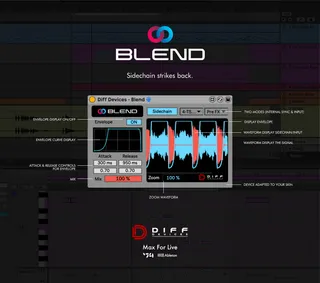
BLEND is a MaxForLive device that creates the “Sidechain” effect. Sidechain compression is used to rhythmically change the volume of audio channels to provide space and definition. As you may know in Electronic music, kick & bass needs to fit well together. This will be perfect to do that. But it can be used in other genres of music as well because it’s built with two modes: “Internal Sync” and with an “Input signal”. No more pops/clicks.
FEATURES:
- Internal Sync Mode (1/8, 1/4, 1/2 , 1/1)
- Input Signal Mode (Choose one of your tracks to trigger the signal)
- Attack & Release Controls
- Envelope Display On/Off
- Mix Knob
- Waveform Display of Both Signals
- Zoom Waveform
- Colours match Live Themes
Usage Guide:
- Simply drag the .amxd file to the track you want “Sidechained”.
- Choose the mode you want.
- Have fun.
* Only works in Ableton Live with Max installed.
* It Requires Ableton Live V11 (minimum).
Comments (2)