Yamaha P-125 Track Control
This is my first plugin, so excuse... everything. I suggest ...
- Type
- MIDI Effect
- Author
- SelfDetached
- Version
- 1.0
- License
- None
- Live version
- 11.0
- Max version
- 8.1.9
- Downloads
- 70
- Updated
- 2022-04-20
Yamaha P-125 Track Control is a MIDI Effect for Ableton Live by SelfDetached, distributed as freeware, with no license specified by the author. It targets Live 11.0 and Max 8.1.9. On maxforlive.com it has 70 downloads. First published 2022-04-17, last updated 2022-04-20.
New to Max for Live? Read what MIDI Effects do, how device licenses work, how to install a device.
Description
This is my first plugin, so excuse... everything. I suggest you don't look inside... It's a mess.
Basically this works like a MIDI mapper, except it bypasses the problem where, when you press on the P-125 button a CC (that changes each time) is registered in ableton, instead of a program change.
INFORMATION:
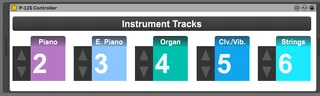
This plugin works in synchrony with the Yamaha P-125. It selects and arms a specific track (selectable in the plugin) when one of the four instrument tacks are pressed on the Yamaha P-125.
So, on the piano when you press one instrument button (ie. Piano or E. Piano or Strings), it will select and arm the track that is written under Piano on the P-125 Controller plugin, while also disarming all other tracks (except track 1)
INSTRUCTIONS/USAGE:
Please make sure on your P-125, that:
Local Control is set to OFF(or you'll hear the Piano's internal sounds)
Receive and Transmit are set to DEFAULT (channel 1)
Program Change is set to ON
Please make sure on Ableton, that:
The plugin is on Track 1
Track 1 is set to arm
FUTURE IMPLEMENTATION:
I will add up to two tracks that will be armed for each instrument
If you found this plugin useful, or wish to suggest something or request an addition, please leave a comment :)