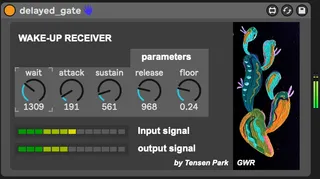
WAKE-UP
UPDATE: fixed a bug with the receiver, and added a release t...
- Type
- Audio Effect
- Author
- MarkTension
- Version
- 1.5
- License
- AttributionShareAlike
- Live version
- 10.1.18
- Max version
- 8.1.5
- Downloads
- 0
- Updated
- 2022-09-17
WAKE-UP is an Audio Effect for Ableton Live by MarkTension, distributed as Creative Commons Attribution-ShareAlike. It targets Live 10.1.18 and Max 8.1.5. First published 2022-08-29, last updated 2022-09-17. 5 user comments below.
New to Max for Live? Read what Audio Effects do, what the AttributionShareAlike license means, how to install a device.
Description
UPDATE: fixed a bug with the receiver, and added a release turn-knob.
---
I've been manually doing this for too long in Ableton, but not NO MORE. This device makes one track react to audio peaks in the other, by adjusting its volume with an ADSR curve.
--------
This device exists of two components, one for each two audio/MIDI tracks.
Component 1: The sender receives audio input and fires a signal when the input signal exceeds the customizable threshold.
Component 2: The receiver is attached to another track, and lowers the volume either completely or partially (depending on the floor dial setting). Only when the sender sends out a signal, will the receiver do a Wake up, which increases according to the settings of wait, attack and sustain.
If you click on the gumroad link below, you'll find a brief youtube demo in the description.
Hope you have fun with it!
lmk if you find any bugs, or have any feature requests. I'll be happy to get in touch!
Mark Tension // Tensen Park
Comments (5)
https://www.youtube.com/watch?v=rbuTKgcteKo
Indeed the side-chain compression is similar in how it takes the volume from one track and enables you to control the volume of another. It's very useful.
The difference with WAKE-UP is the timing aspect. So instead of directly lowering the volume of another track (like in the sidechain compression), WAKE-UP gives you control over how long to wait before the effect kicks in (WAIT), as well as how fast the effect kicks in (ATTACK):
- The wait period can be up to 4 seconds.
- There's up to a 2 second attack period in which volume is increased linearly
I've especially found this useful in my own ambient music in which for example one sound sometimes peaks, which them triggers another drone track to follow in its footsteps. I used to do this manually with automation, but that's not so nice and doesn't work in the clip view.
Still have some updates in mind wrt the ramp up curve, and allowing to effect multiple other tracks instead of just one.
Any feature requests are much welcome.