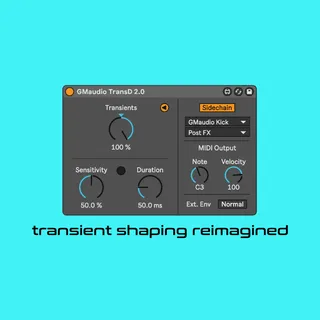
GMaudio TransD
GMaudio TransD has been completely redesigned for Version 2....
- Type
- Audio Effect
- Author
- groovmekanik
- Version
- 2.0
- License
- Commercial
- Live version
- 11.2
- Max version
- 8.3.3
- Downloads
- 0
- Updated
- 2022-10-23
GMaudio TransD is an Audio Effect for Ableton Live by groovmekanik, distributed as a commercial (paid) device. It targets Live 11.2 and Max 8.3.3. First published 2022-10-11, last updated 2022-10-23. 4 user comments below.
New to Max for Live? Read what Audio Effects do, what the Commercial license means, how to install a device.
Description
GMaudio TransD has been completely redesigned for Version 2.0.
Intro Video: https://youtu.be/jld8veYiaY8
Walkthrough Video: https://youtu.be/H--LDxsDBOA
Concept
~~~~~
A transient can be defined as the start of a new sound and is usually less than 30ms in length. TransD 2.0 allows you to control the mix between these short bursts of sound and the original signal, with negative values attenuating them. The sensitivity control allows you to fine tune how many transients are ‘picked up’ by the algorithm and for each transient that is detected, a specialized envelope is generated to control the amplitude of the incoming signal.
This is very different to a compressor which can only react when the amplitude reaches a threshold, with different sounds producing different envelopes that will never reach zero amplitude.
The result is that you can reshape the dynamics of the signal much more like you would on a synthesizer and nothing like you would with a limiter. It should be glaringly obvious at first use that this is a unique and useful tool that reaches beyond what is currently possible with Live, or any other transient designer.
Controls
~~~~~
There are 3 main parameters, all of which can be automated and have a wide useable range, controlling many internal parameters. The device is further expanded with Sidechain Input, MIDI Output and an External Envelope. GMaudio TransD 2.0 can effectively control up to 3 sounds at once with one instance, with parameter changes affecting all three sounds. You can also use it in an Audio Effect Rack to apply different processing to different parts of the signal. Check out the User Manual for more information and keep an eye out for upcoming videos.
All audio processing is custom code in gen~ carefully designed to avoid oversampling, with over 100 iterations being tested.
Requirements
~~~~~
This is a Max For Live Device and therefore requires Ableton Live 10 or 11 Suite, or Standard with the Max For Live add on.
Ableton Live 11 is required for MIDI output.
This device also requires Max 8.2.2 or above to operate as intended. You can update Max for free... Here's how;
https://help.ableton.com/hc/en-us/articles/209070309-Using-a-separate-Max-for-Live-installation
~~~~~
If you enjoy using this device, please rate it 5 stars 😁
Happy Music Making! 🚀😎🎶
Comments (4)
I've some of them really usefull.
But sometimes they auto copy a new version of them in the max folder, do you know why? and how to avoid it?
I don't understand exactly when, but sometimes i got 20 more versions of them. I think its when i make an effect rack, not sure.
Cheers