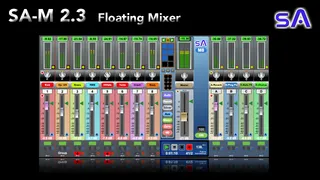
SA-M Floating Mixer 8 16 24 32 48 Tracks
SA-M Max4Live.com Details Welcome to the SA-M 2.3 Floatin...
- Type
- Audio Effect
- Author
- SonicAlchemyst
- Version
- 2.3
- License
- Commercial
- Live version
- 9.1
- Max version
- 7.1
- Downloads
- 0
- Updated
- 2024-03-01
SA-M Floating Mixer 8 16 24 32 48 Tracks is an Audio Effect for Ableton Live by SonicAlchemyst, distributed as a commercial (paid) device. It targets Live 9.1 and Max 7.1. First published 2022-12-28, last updated 2024-03-01. 13 user comments below.
New to Max for Live? Read what Audio Effects do, what the Commercial license means, how to install a device.
Description
SA-M Max4Live.com Details
Welcome to the SA-M 2.3 Floating Mixer for Ableton Live
SA-M 2.1 walkthrough (2.3 Video in production)
https://www.youtube.com/watch?v=DqE2m8Bi5SI
IMPORTANT NOTE: The SA-M Series requires Max For Live 7.0 +
New Features in 2.3
2.3 includes a couple of major functionality updates and fixes. The SA-M is much faster and more responsive. The MIDI mapping has been completely rebuilt.
~ Updates ~
Track Data Flow
Track data flow engine has been completely rebuilt for faster and smoother response.
MIDI Mapping MIDI mapping and external control have been rolled into a faster more efficient system that works more reliably.
MIDI Mode: StudioLive
The StudioLive function in previous versions has been removed with faster and smoother MIDI mapping functionality.
Auto Load Button
The Auto load button action has been revised to decrease load time.
Presets
Presets load faster and can be more easily controlled from and external controller. Saved presets will be loaded when a project is reopened in Ableton.
Solo Reset and Arm Reset Buttons
Solo Reset and Arm Reset Buttons can be MIDI mapped.
Information Window
Now includes update information.
Track Pan Displays pan L-C-R numbers.
Group Track Display Group tracks are now clearly indicated.
~~~~~~~~~~~~~~~~~~~~~~~~~~~~~~~~~~~
~ Introducing the SA-M Series ~
The SA-M is a customizable floating mixer Max4Live plugin for Ableton Live. The SA-M gives you a fully functional floating mixer, enabling you to have the mixer functions available in the arrange window, or open on another screen.
The SA-M comes in 8, 16, 24, 32 or 48 track versions. They all have 4 Return Tracks.
Each track has 4 Aux Sends.
The SA-M is always there, always available, no matter where you go in the session or arrange views.
Bonus: The versions with more tracks also come with all the smaller mixers.
** SA-M Features **
Note that features available will vary depending on the SA-M plugin version.
Layout
Tracks: 8, 16, 24, 32 or 48
Aux Sends: 4 (2 for the Lite version)
Return Tracks: 4 (None for the Lite version)
Window Scaling: 50 - 100%
Linear / Stacking modes: Switch mixer between a linear or stacked layout for monitor space saving (32 and 48 tracks versions).
Float Mode: Float or unfloat the plugin window for virtual desktop use.
Controls
Transport Controls: Play, Stop, Record, Automation tracking.
Project Information: Clock / Tempo /Bars & Beats
Auto Track Select: Fill the mixer automatically with tracks from your project.
Custom Track Select: Select the tracks you want in the mixer.
Track Color Switch: Project colors or silver
Track Selection Reset: Clears all channels in the mixer removed selected tracks.
Global Controls
Fader Zero Reset: Sets all track faders to zero dB.
Fader - ∞ dB Reset: Sets all track faders to - infinity.
Meter On/Off: Switches all the tracks meters on or off.
MIDI Mapping
Control the mixer from your external MIDI Controller.
Snapshots & Presets
Speed up your workflow with mixer snapshots and presets.
Track Details
Track Name Selection: Select the track using a drop-down track name list.
Track Number Selection: Select the track using the project track number.
Meters: Displays the VU and Peak track levels.
Meter On/Off {Freeze}: Switch on and off (freeze) track meters.
Pan: Pan track audio left and right
Volume Fader: Control the volume level of the track.
Fader Zero Reset: Reset the volume fader to 0dB.
Track Activator: Switch the track on and off.
Solo: Solo the track.
Global Solo Reset: Un-solo all tracks that are soloed.
Record Arm: Arm the track.
Global Record Arm Reset: Un-arm all tracks that are armed.
Ableton Current Track Selector: Select the track in Abelton and jump to it in the session view.
Automation Indicators: Show tracks that automation in them, and tracks with automation over-ride.
Automation Reset Buttons: Resets all tracks back to automation from automation over-ride.
Software Requirements
Ableton Live 9.0 +
Max For Live 7.0 +
Hardware Requirements
These plugins were all built on a 2012 Mac.They should work quiet happily on any hardware newer than that. :)
~ Ableton Live Group Track Data ~
When a group is folded in the project, Ableton does not generate individual track output level data. The output data is not being shows in the project.
I have pointed this programming error out to the Ableton team, and they now aware of it. :)
This means that track meters of for tracks in the mixer will not show any meter values either until the group is unfolded.
—— 2.3 ——
~ Updates ~
Track Data Flow
Track data flow engine has been completely rebuilt for faster and smoother response.
MIDI Mapping MIDI mapping and external control have been rolled into a faster more efficient system that works more reliably.
MIDI Mode: StudioLive
The StudioLive function in previous versions has been removed with faster and smoother MIDI mapping functionality.
Auto Load Button
The Auto load button action has been revised to decrease load time.
Presets
Presets load faster and can be more easily controlled from and external controller. Saved presets will be loaded when a project is reopened in Ableton.
Solo Reset and Arm Reset Buttons
Solo Reset and Arm Reset Buttons can be MIDI mapped.
Information Window
Now includes update information.
Track Pan Displays pan L-C-R numbers.
Group Track Display Group tracks are now clearly indicated.
~ Fixes ~
Group Track Button Display
The way that the group tracks are displayed has been updated so the Arm button is not display.
Track Pan Automation Reset
Track Pan Automation Reset button follows automation data correctly,
Return Track Pan Automation Reset
Return Track Pan Automation Reset button follows automation data correctly,
Mixer Reset
Track Activate, Solo and Arm buttons reset correctly.
Preset Data
Track Activator, Solo and Arm buttons follow the track data correctly when switching presets.
Transport
Set the time, bars and tempo to ignore click.
----- 2.2.1 ——
Updates
Float Mode Switch the plugin window between floating and non-floating. For use with virtual desktops.
Relative fader values for touch screen
Control the SA-M seamlessly with touch screen control.
Ableton Current Track Selector and Grouped Track Selector
Select the current Ableton project from 3 areas on the tracks.
Return Track Selection
Select a Return Track as the Ableton project current track from 3 areas on the Return Tracks.
Fixes
MIDI tracking is bi-directional
In MIDI mode Track Faders follow changes made on the project screen.
Live MIDI mapping mode on PC’s
Faders respond correctly when using MIDI mode on Windows 10+
Meter ON/OFF
Meter ON/OFF button displays correct on startup.
----- 2.2 Updates ———
MIDI Mapping
The SA-M can now be MIDI mapped to an external MIDI controller adding amazing power and flexibility Snapshots & Presets
Create up to 8 snapshots of the SA-M state for quick recall, and faster work flow.
Project Data
Time / BPM Tempo / Bars & Beats have been added to the Transport Control section.
Fader Width Increase
The active part of the Volume faders have be widened for easier use on touch screens.
Information Window
A separate information screen has been added giving details about the plugin.
----- 2.1 Updates -------
** Functionality Updates **
~ Track Selection ~
Track Name List
- The name list has been increased from 127 to 255 to allow for very large projects.
- The font size has also been increased for easier readability.
Track Number
- The maximum track number has been increased from 127 to 256 to allow for very large projects.
~ Return Track Selection List ~
- The font size has also been increased for easier readability.
~ Ableton Project Track Selector ~
- All tracks can now be selected regardless of being in a closed group or not.
- Added extra selection button bar to the left of the track slot.
In this example the button bar displays under the db values to the left of the track fader.
~ Ableton Project Master Track Selector `
Ableton Project Master Track Selector button and button bar buttons have been added to the Master Track.
** UI Updates **
Track Title
- The blue surround has been removed for clearer visibility of the track title.
Comments (13)
Thank you for you fantastic feedback.
I really appreciate you taking the time to share your comments, and suggestions.
To answer and respond:
Question: "I received a serial # on the Gumroad page, but I suppose there is no where to input it?"
Answer: There is no where to input the license key at the moment. I have include that from the beginning, so that if and when these plugins become VST/AU plugins with a license, current users like yourself will have a license key already to go. :)
Comment:
"I'm currently using the 48 track version. It can get a tad confusing when you have the mixer faders stacked in two vertical rows."
Response:
I agree on the idea of the faders in one row like a traditional mixer. I was toying between a little bit of scrolling, or a stack and no scrolling, with scaling to fit on the screen.
I opted for the stack.
I do have the intention of adding a layout shifter for the larger mixers, putting all the tracks in one row, with a toggle to go from the linear mixer view to the stacked mixer view. :)
Comment:
"....noticed a possible bug with grouping other groups, the meters just stop working period."
Response:
Thank you for spotting that. These plugins where build in Live 9, which does not have the grouping-groups function. I do have Live 10 and 11, but do not use that function, and thus did not test through that feature. I shall take a look at resolving that for the next update. I do know that there are some things in Ableton Live that are just not possible though. Thank you for spotting this. :)
Comment:
"....graphically speaking the mixer isn't terrible but could use a more modern look..."
Response:
Well.... I was going for a more retro ('dated') look. So I'm happy for your comment, because that's the feel I was going for. :)
Did you switch from the colored strips to the plain silver tracks? Is that less 'dated/amature'
Which version of Logic are you on?
I personally prefer the Logic UI to the Live UI.
I'm adding your comment to my update list, with the intention of having 'skins'/'look and feel' versions, so that you can pick the style that feels best for you and your work flow. :)
Thank you once again.
Sonic Alchemyst
Thanks for taking the time to respond and to look into some of the comments I shared. I suppose I was a tad redundant (wrote similar stuff on your gumroad update) sorry about that. Looking forward to your future updates!
To answer your questions, i'm currently using Logic Pro 10.7.5, here is a quick sample of how the design looks for that: https://i.imgur.com/fi91w9e.png
Honestly, after using your Mixer plugin for a while, the design is somewhat growing on me. Perhaps I was a tad harsh by saying "Amateur" in my initial assessment of the UI look. I suppose when it comes to art, beauty is in the eye of the beholder and I can see what style you were going for.
Anyways, thanks again for the response and keep of the amazing work!
Thanks for sharing the image from Logic. Yes... That's what I'm used to too. :) That's kinda why I created the more simple 'Silver' version function with less color. I'm definitely wanting to add different styling for future releases. :)
Comment: "Mixer in linear format"
Response: I've got several customers requesting a linear version, so that's definitely top of my list, with the sub-grouping meter bug that you discovered.... Thank you for that one. :)
Comment: "realtime updating to the mixer"
Response:
I'm totally in agreement on the realtime updating idea.
I've actually been looking into that from the very beginning. The closest that I've got is the manual 'Auto' feature. The extra challenge is that as I built the mixer to be custom populated with tracks, the mixer setup is completely random.
The realtime updating is definitely still on my radar. :)
Thank you for feedback once again.
Sonic Alchemyst
~ Ableton Group Data Issue ~
I have done a lot of testing and research on forums etc about the meters not working on groups and sub-groups.
It appears that this is an old Ableton Live issue from as back as far as when Groups were added.
When the group is folded/closed, there is no output level data being generated on the tracks inside the group', thus nothing for the meters to display. The only way for the track to generate the data is for the group to be unfolded.
I shall keep researching. Hopefully Ableton will modify the data follow to allow the generation of this data.
Sonic Alchemyst
Thank you for your purchase, and thank you for reaching out.
To respond in order to your comment:
There is a free version here:
https://maxforlive.com/library/device/8643/sa-m8-lite-8-track-floating-mixer
~ Virtual Desktops ~
I will email you about this an we can take a look at it together.
I use 4 monitors in the studio, and put the mixer on one of them, which in a touch screen.
Sonic Alchemyst
First of all, thank you for developing this tools, I really appreciate them and the ease my workflow.
I received an email communicating the update of SA-M Floating Mixer 8 16 24 32 48 Tracks to version 2.3.
I purchased SA-X 2.2.1 Floating Mixer Collection for Ableton Live (8, 16, 24, 32 or 48 tracks), which I understand that contains a SA-M which is provided with a name change (SA-MX instead), please correct me if I'm wrong.
Following the reception of the mail, I went to Gumroad's site to download the updated version, in which I only have access to the downloads for the products I've purchased, in my case SA-X 2.2.1 Floating Mixer Collection for Ableton Live (8, 16, 24, 32 or 48 tracks) and SA-TS 1.1: 48 Track Floating Track Selector for Ableton Live.
The download of the version SA-X provides with the following files:
|-SA-X32
| |-SA-FX32 2.2.1.amxd
| |-SA-AX32 2.2.1.amxd
| |-SA-VX32 2.2.1.amxd
| |-SA-MX32 2.2.1.amxd
|-SA-X16
| |-SA-FX16 2.2.1.amxd
| |-SA-MX16 2.2.1.amxd
| |-SA-AX16 2.2 1.amxd
| |-SA-VX16 2.2.1.amxd
|-SA-X8
| |-SA-VX8 2.2.1.amxd
| |-SA-FX8 2.2.1.amxd
| |-SA-AX8 2.2.1.amxd
| |-SA-MX8 2.2.1.amxd
|-SA-X24
| |-SA-AX24 2.2.1.amxd
| |-SA-FX24 2.2.1.amxd
| |-SA-MX24 2.2.1.amxd
| |-SA-VX24 2.2.1.amxd
|-SA-X48
| |-SA-VX48 2.2.1.amxd
| |-SA-MX48 2.2.1.amxd
| |-SA-FX48 2.2.1.amxd
| |-SA-AX48 2.2.1.amxd
I believe .amxd are from around September 2023.
Please, would you be so kind as to update the files that apply?
Thank you so much for your kind assistance.
Ulak
Thank you for your purchase. I'm happy to hear that the plugins are assisting your work flow.
To answer your questions:
The SA-M and SAMX are 2 different products.
The SA-M has 4 Aux Sends and 4 Returns and only includes the SA-M mixer.
The SA-M has been updated to version 2.3
You purchased the SA-X Collection, which includes the MX, FX, AX and VX.
Tte X collection has 8 Aux Sends and 8 Returns.
The X Collection is currently and version 2.2.1
So the 2.2.1.amxd files are the current ones, and all the files on Gumroad are the current versions.
I'm working on SA-X 2.3 at the moment, and will have that completed in the next couple of weeks. There are some major updates and fixes in version 2.3.
Stay tuned and keep your eyes on an email coming soon. :)
Sonic Dragon
Thank you for your prompt clarification, I appreciate it.
I'll stay tuned.
Have a great day!
Ulak