FM PM Demonstration
This is a demonstration patch I made in response to a discus...
- Type
- Instrument
- Author
- OspreyInstruments
- Version
- 1.0
- License
- None
- Live version
- 10.1.18
- Max version
- 8.1.5
- Downloads
- 303
- Updated
- No Updates
FM PM Demonstration is an Instrument for Ableton Live by OspreyInstruments, distributed as freeware, with no license specified by the author. It targets Live 10.1.18 and Max 8.1.5. On maxforlive.com it has 303 downloads. Published 2023-02-01. 1 user comment below.
New to Max for Live? Read what Instruments do, how device licenses work, how to install a device.
Description
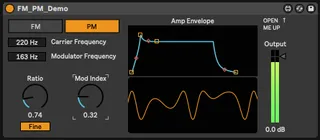
This is a demonstration patch I made in response to a discussion on a forum regarding the differences between FM and PM synthesis. This can easily switch between both. It is a very simple mono synth with no bells and whistles. I wanted to keep it simple so that the patching concepts were evident to anyone who opens it up.
To view the patching, click on the edit button on the device once it is loaded (there are 3 buttons on the top right, this is the left-most one with a squarish icon). Once the patch is opened in Max, it will likely load in "Presentation Mode". We need to change this to "Edit Mode" by pressing "command-E" on a mac, or "control-E" on windows. I tried to label and organize everything so that it could easily be traced and understood.
One note of usability: I noticed that when you are adjusting the Ratio in Course mode, it can get stuck if you are trying to move it from 0. The work around is to switch to Fine mode first to move it above 1, then switch back to Course.
I included the oscilloscope which works well in curtain frequency ranges, and only only with gentler modulation. If you need a better one, the free Melda MOscilloscope is pretty good. I'd also highly recommend dropping a Spectrum analyzer after the device to see what is really going on with each method.
Comments (1)