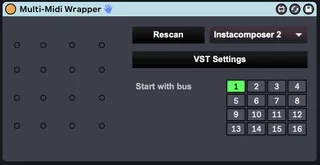
Multi-MIDI VST wrapper
This was called "Instacomposer Wrapper" because it's the ...
- Type
- MIDI Effect
- Author
- soaria
- Version
- 2.1
- License
- AttributionShareAlike
- Live version
- 11.2.6
- Max version
- 8.3.1
- Downloads
- 1,694
- Updated
- 2023-08-15
Multi-MIDI VST wrapper is a MIDI Effect for Ableton Live by soaria, distributed as Creative Commons Attribution-ShareAlike. It targets Live 11.2.6 and Max 8.3.1. On maxforlive.com it has 1,694 downloads. First published 2023-08-13, last updated 2023-08-15. 24 user comments below.
New to Max for Live? Read what MIDI Effects do, what the AttributionShareAlike license means, how to install a device.
Description
This was called "Instacomposer Wrapper" because it's the biggest use case I have on hand, but it will generally let you work around the goofy lack of MIDI channel routing in Live. Pick a "base" bus number, and then put a MIDI receiver before each instrument. (e.g. "start with bus 1" and then "receive 1", "receive 2", etc, up to "receive 16").
Several Max4Live devices use the same protocol by default, and the UI in this one is based somewhat on one called "Max MIDI Receive" and "Max MIDI Sender".
You will also need a MIDI receiver device that accepts the standard-ish "M4L.MidiBus-%i" messages. Originally I was directing people here:
https://www.ableton.com/en/packs/max-7-pitch-and-time-machines/
But since that only supports 12 channels, I've built an updated device that does all 16:
https://maxforlive.com/library/device.php?id=9451
This device is a revamp/rework of my earlier version. I decided to leave that as a separate entry in case the older one was working better for someone.
https://maxforlive.com/library/device/7990/instacomposer-wrapper
Since that one, I've added support for all 16 channels, and it's also capable of saving its state properly for presets and such.
I'd like to make a short tutorial about this some time, but it's not ready yet.
Changes since 2.0:
* Pipes through input MIDI to the selected VST
Comments (24)
The VST inside the device does however not accept MIDI in messages.
Do you think, this would be possible?
I tried only with Cherry Audio Voltage Modular so far.
IF you could implement it, that would make it the most handy tool for these application! ThX!
seems like you added changes already!
Two minor things, I would welcome:
1. The VST does not keep its preset when re-opening a project. (not sure if Instacomposer does, but VM does not)
2. ability that the windows stays open even when clicking somewhere else in the Live window.
But these are really minor things. Happy that the MIDI in works now.!
Thanks a lot for this device.
I just upgraded to InstaComposer2, because it can now sync with Live's start/stop state.
This is a massive feature for me, as I can have a drum track etc running in sync with InstaComposer2.
However, Live's transport start/stop state does not seem to be relayed through your wrapper to InstaComposer2.
Would this be possible to implement?
(I would gladly make a donation for this functionality.)
Also, stuff like the window clipping and resizing is probably a Live/Max thing I can't fix in the device. :| But who knows, maybe Max is hiding some kind of cached sizes or positions in its depths.
I didn't see the start/stop issue in IC2, myself, but that sounds like it might be fixable.
If anyone wants to fix any of the problems before I get to it again, I'm happy to take a look and update this device entry, though.
Your wrapper is really the missing piece for me to start enjoying working with IC2.
Thats why I am really sorry that the wrapper does not seem to relay when I press spacebar og click the transport start/stop buttons, which was the last piece of the puzzle.
Again, if its fixable, I would love to make a donation to your effort via Paypal or otherwise. Just let me know. I can also help beta test.
Just a clarification - I just re-tested it in the latest Live 11.
IC2 does not respond to spacebar presses (transport start/stop) when the IC2 VST window is open and in focus, and the track has your Wrapper on it.
It does respond to spacebar presses when focus is on the Live window, and the IC2 VST window is out of focus (minimized).
However, on a track without your Wrapper on it, just IC2, the IC2 VST responds to spacebar presses, even with the IC2 VST window open and in focus.
Hope that helps ;-)
I do appreciate the offer :) but I'm less money constrained than time constrained these days. I'll definitely get back to it sooner or later, since I'm planning to do more Live in the near future, and this lack of channel support is still a ridiculous thing in the DAW. I don't get it... *shrug* I'd pay Ableton to add some MIDI channel support :P
I had hoped that Live 12 would have this MIDI multi channel routing capabilities, but that does not seem to be the case, so I might be skipping that release.
Which means that your 2 M4L devices are really useful and ingenious pieces of code. Big thumbs up!
Well, heres hoping that you find a way to pass through spacebar, but in the meantime - thanks a million.
Also it kinda wants to be a programming environment but is really awful at it?
Okay, that complaining aside, it appears that whether a VST's internal state will be saved is a question of author. I tested a bunch, and here is what I found:
- Does work: IC, IC2, Kontakt 7, Pigments
- Doesn't work: VM, Captain Epic plugins
Those last two are truly regrettable, because you do a lot of creative work inside the VST itself. :( Pigments had the full preset I'd loaded still, and Kontakt went as far as having the sample libraries still loaded.
I tried saving the parameters instead of snapshots of the internals, but a lot of plugins simply don't expose parameters, or very few. ICx for example, exposes one parameter called ParamChange. :eyeroll:
So, as much as I'd love to fix that stuff up... I don't see a good way. Put together with the keyboard stealing, window size issues, etc, it seems Max really doesn't have very good VST hosting support, either. I really wish I could just talk to the VST hosted inside Live itself, but the Live API doesn't seem to handle stuff like MIDI data. If anyone has ideas, feel free to comment!
"I spent a bunch of time looking at the various issues today, and fi..."
Well, Soaria - thanks for trying and thanks for a great device ;-)
Thanks!
how fixe this problem
thx for you work!!!
consol say
dict: doesn't understand "int"
Maschine 2.vstinfo: no format VST exists
dict: doesn't understand "int"
I don't know how fix the problem
but it would be a revolution for the user maschine 2
Thank for this device it's super useful! I'm trying to use the Maschine 2 VST in Live 12 and it works for sending midi out on different channels to external synths in Live. However, it looks like Live isn't receiving any MIDI CC info like pitch, mod wheel, etc.
Does your M4L only deal with midi notes?
Also I noticed it's not saving the Maschine 2 preset when loaded into the device.
Thanks for your efforts and let me know if I'm missing something, thanks!