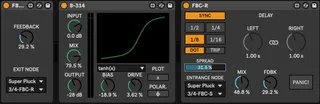
Feedback Chain
FBC let's you add your own effects into the delay line so t...
- Type
- Audio Effect
- Author
- OspreyInstruments
- Version
- 1.0
- License
- None
- Live version
- 10.1.18
- Max version
- 8.1.5
- Downloads
- 0
- Updated
- 2023-09-25
Feedback Chain is an Audio Effect for Ableton Live by OspreyInstruments, distributed as freeware, with no license specified by the author. It targets Live 10.1.18 and Max 8.1.5. Published 2023-09-25. 1 user comment below.
New to Max for Live? Read what Audio Effects do, how device licenses work, how to install a device.
Description
FBC let's you add your own effects into the delay line so that you can build any delay you like. There is a send node and a receive node (entrance/exit node) with the effects chain sandwiched in-between them.
To use, drop FBC-S in the device rack first and FBC-R second. Insert any audio effects you like in between them. On each of the node devices, you must send configure the audio routing to point at the other device in the pair. Then you can safely turn off the "Panic!" button that mutes the outputs.
Comments (1)