- Type
- MIDI Generator
- Author
- Gross9978
- License
- AttributionNonCommercialShareAlike
- Live version
- 12.2
- Max version
- 9.0.7
- Downloads
- 407
- Updated
- 2025-06-12
ClipCombiner2 is a MIDI Generator for Ableton Live by Gross9978, distributed as Creative Commons Attribution-NonCommercial-ShareAlike. It targets Live 12.2 and Max 9.0.7. On maxforlive.com it has 407 downloads. First published 2024-08-26, last updated 2025-06-12. 2 user comments below.
New to Max for Live? Read what MIDI Generators do, what the AttributionNonCommercialShareAlike license means, how to install a device.
Description
2- completely rewritten in JS,
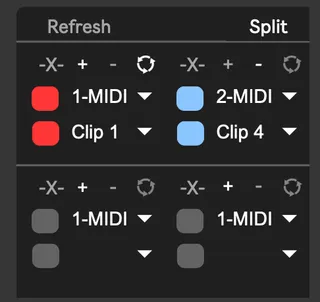
Changed the device to only use 4 clips instead of 8
shorter clips can be set to loop to fill the space of longer clips
Clips can be added or subtracted from each other in order top left to right bottom.
Added a selectable mode to determine how notes are combined
Cut- When notes overlap the overlapping portion of the note is cut.
Split and Continue- When notes overlap, the overlapping portion of the note is split and continues after the combined note.
1.3 Bug Fix, Got rid of the popup version so I didn't have to fix/update multiple versions.
Clip Combiner lets you select and merge up to 8 clips, it works in either Session or Arragement view but only one at a time.
Step1- Create an empty midi clip of the desired length in Session or Arrangement view and open ClipCombiner from the Midi Generators tab
Step2- Select up to 8 midi tracks and clips from the drop down menus, you have to select a clip even if there's only 1 available
Step3- Click "Get Clips" and the selected clips will be combined into the empty midi clip
It works best when the clips you're copying are already the length you'd like them to be, copying a 1 bar clip that loops 40 times in arrangement view will only copy the first bar.
I typically drag out the clip to loop it then consolidate the clip before merging with others.
I mainly made it for use in Arrangement view to combine long polyrhythms into one clip without the need to record to a new midi track but I'm sure it has other use cases.
Comments (2)