Motto Akemie Wrapper
1.3 Fixed a few things and got rid of a lot of the undo spam...
- Type
- Instrument
- Author
- Gross9978
- Version
- 1.3
- License
- None
- Live version
- 12.0.5
- Max version
- 8.6.2
- Downloads
- 201
- Updated
- 2025-07-14
Motto Akemie Wrapper is an Instrument for Ableton Live by Gross9978, distributed as freeware, with no license specified by the author. It targets Live 12.0.5 and Max 8.6.2. On maxforlive.com it has 201 downloads. First published 2024-10-28, last updated 2025-07-14. 6 user comments below.
New to Max for Live? Read what Instruments do, how device licenses work, how to install a device.
Description
1.3 Fixed a few things and got rid of a lot of the undo spamming. It still fills it up when you hit random a bunch but it's better than it was. Removed the device id from the main wrapper and added a DrumRack version for use with the voice wrapper with a few changes, it works better with remote mapping but modulation seems to occasionally have a hiccup, If you know why feel free to let me know:) There's a prebuilt drumrack in the download that should work as long as the 3 devices are in your library, if not check the device id and voice id on the voice wrappers and drumrack main devices.
1.2 Added a Remote Device with selectable Device and Voice that way parameters are adjustable from each cell in a drum rack or track in a group. Just make sure the "D" value matches on the main wrapper and the remote.
1.1 Changed the UI and added bidirectional control from the plugin. Included an adg. of a drumrack and an als. of a pre-routed multichannel group.
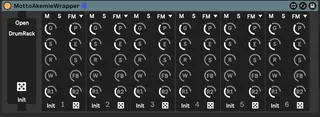
This is a wrapper for ALM Busy Circuits Motto Akemie VST3 Plugin. It ain't pretty but it adds some functionality I was missing. It adds the ability to randomize all or each voice as well as the ability to init all or each voice. It also has a "DrumRack" mode which, when enabled, makes the plugin respond to the first 6 cells/notes in a drum rack instead of the native behavior which is each voice responding to a different midi channel. If that's preferred, unclicking "DrumRack" restores that behavior. It still has each voice available as a separate audio out from the plugin in either mode. I don't know if this is a particularly popular plugin but I dig it and thought someone else may find it useful.
Obviously this only works if you have the plugin installed. If you have the plugin and it doesn't work it's probably something to do with the plugin location being different. Im on a MAC so it may work differently for another OS or it may need to be set for each computer, I have no idea. If that's the case you may need to open it up and set your plugins location on the vst~ in Max.
Comments (6)