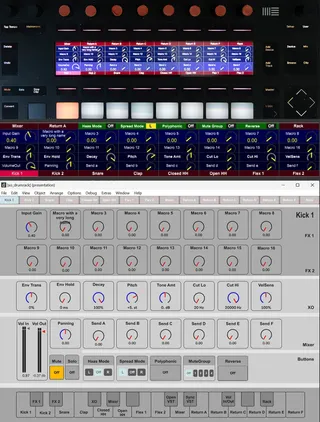
XO-DrumRack for Push 2 or Arturia Minilab MKII
XO Drum Rack for Push 2 or Arturia Minilab MKII PLEAS...
- Type
- Instrument
- Author
- xanadu
- Version
- 1.0
- License
- None
- Live version
- 11.3.35
- Max version
- 8.5.8
- Downloads
- 342
- Updated
- 2025-03-18
XO-DrumRack for Push 2 or Arturia Minilab MKII is an Instrument for Ableton Live by xanadu, distributed as freeware, with no license specified by the author. It targets Live 11.3.35 and Max 8.5.8. On maxforlive.com it has 342 downloads. First published 2025-01-19, last updated 2025-03-18. 12 user comments below.
New to Max for Live? Read what Instruments do, how device licenses work, how to install a device.
Description
XO Drum Rack for Push 2 or Arturia Minilab MKII
PLEASE NOTICE: This first version of this device depended on p2d by Sigabort. It is now replaced by version 2.0. This version uses its own DLLs and doesn't have external dependencies anymore.
The new version is here: https://maxforlive.com/library/device.php?id=12188
Comments (12)
I am always amazed to see devices use the push screen. And I would love to give it a try but I don’t know where I can still get P2D. I think the option to download it from the linked side is gone.
Any help would be very welcome.
I would not have published my device if P2D was no longer available. But it is available for 5 euro and it is working with Live 11 and 12, MaxForLive 8 and Max 9.0.
Greetings, Willem (aka Xanadu)
Willem (aka Xanadu)
I hope you will be able to figure this out. I would love if I could help you but I don’t now anything about programming software (I prefer programming beats)
This was a major task for me: creating two dynamic link libraries in C/C++. I did not program C++ anymore since about 2000. With the help of ChatGTP I reached success on all critical parts of thsi project. ChatGTP is not a great programmer, but it has an enourmous knowledge of program code that can be found on the internet. It also is a nice buddy that always stimulates me to go on.
This is how it's gonna work. The libusb-1.0.dll file that came with Live is renamed to libusb-1.0.original.dll. I created a new libusb-1.0.dll which comes in between Live and the original one. My libusb-1.0.dll can:
1. blend frames from Live and MaxForLive on a per pixel basis. The brightness for both streams can be set from 0 to 1.275.
2. Send the frames from Live to MaxForLive as jit.matrices.
3. Adjust the blend mask on command from MaxForLive.
There also is a wjl_push2_lcd external for MaxForLive.
This device:
1. Sends jit.matrices to libusb-1.0.dll.
2. It also sends display commands to control the blending for each pixel of the display. You can set the blend mode for any reagin defined by xPos yPos width height or the whole display. Blend modes include Live only and MaxForLive only.
3. Receive the frames from Live as jit.matrices. I don't know if this is very usefull, but using thsi feature we can have parts of the Live stream to the Push2 in our MaxForLive patchers..
I'm sorry this is Windows 10 or 11 only, no MacIntosh/Apple. I don't have a Mac.
I'm so glad I could solve the puzzle after about 2 weeks!
Greetings,
Willem (AKA Xanadu)
With help from ChatGTP I manged to create my own drivers for the Push2 display. The source code is included.