VST Wrapper - supporting all parameters
December 2022. Version 1.1 has support for the Max standalon...
- Type
- MIDI Effect
- Author
- xanadu
- Version
- 1.1
- License
- None
- Live version
- 10.1.30
- Max version
- 8.1.7
- Downloads
- 2,302
- Updated
- 2022-12-22
VST Wrapper - supporting all parameters is a MIDI Effect for Ableton Live by xanadu, distributed as freeware, with no license specified by the author. It targets Live 10.1.30 and Max 8.1.7. On maxforlive.com it has 2,302 downloads. First published 2021-01-22, last updated 2022-12-22. 16 user comments below.
New to Max for Live? Read what MIDI Effects do, how device licenses work, how to install a device.
Description
December 2022. Version 1.1 has support for the Max standalone application to provide assignable MIDI mapping. It will work without a licence, but in that case saving is not possible.
With a little tweak we used to get a maximum of 128 parameters for VST instruments and effect in Ableton Live. Not anymore in the latest updates. There is no priority on repairing this in the near future.
As a work around I installed Live 8 Intro to get my 128 parameters back. Then I saved the VST in an .ALC file and reloaded that in Live 10. This works, but nah, it’s not what you want.
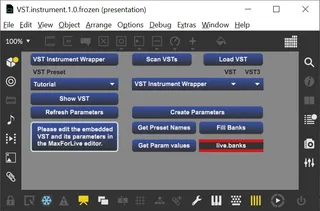
I’ve taken some Corona-lockdown-time to create a wrapper around VST plugins in MaxForLive. It can automatically create Live-parameters for all internal parameters of the VST. You can access these from any MaxForLive device you create. Also, these parameters are immediately integrated into the Push 2 infrastructure. You can edit the access of Push 2 in named banks.
There are two versions:
- 1 channel VST.Instrument wrapper
- 1 channel VST.Effect wrapper
It should be easy to construct a multichannel channel VST.Instrument wrapper, but perhaps there’s more to it than just create some extra audio outputs.
DIY. When MaxForLive first came out editing your own ‘patchers’ and devices was the natural thing to do. In recent years prebuilt devices came to the market, some of them only working with a payed license. This device is a step back in time. To use it you must use the MaxForLive editor to create the parameters for your VST. But don’t worry, there is a step-by-step getting started manual.
One step further is to customize the wrapper for your own needs. To get started there is a technical reference for the Max code, a MIDI sheet and a listing of the JavaScript code.
Todo:
- Support for Audio Unit devices (Mac) – But I don’t have a Mac ;-)
- Editing Live Banks using a text editor, if there is public demand. Please ask in the comments.
- Multi channel versions (?).
- Further enhancements.
Comments (16)
Just brought my Mackie C4 to play nicely with Live11 but the unexposed parameter thing for lot of plugins were meh. So will definitely use this one.
Thank you!! :-)
-_PluginAutoPopulateThreshold=128
or
-_PluginAutoPopulateThreshold=-1.
When you load a VST you can save it as an .ALC file and load that in Live 11. Then you'll have your 128 max parameters in the latest and greatest version of Live.
thanks for providing this plugin!
I'm desperately looking for a way to control more than 128 parameters on a vital synth from my midi controller. Also, i'm a pretty new to Maxforlive and was wondering if it is directly possible to midi-map the parameters that your plugin creates. So far i saw that the plugin generates dials which can also be included in the presentation, but can't be midi-assigned.
What is the recommended workflow to get midi-mappabale parameters created?
MIDI mapping works with the standalone application Max. Max also supports AMXD files now. I've altered the VST.instument to support audio out and note input from a MIDI port. Forst the plugin is loaded in Ableton with MaxForLive. The parameters are created and the device is saved. This saved device is then opened in Max standalone. Now MIDI mapping can be assigned, but saving is only possible with an additional standalone licence.
Mapping with Push2 is possible and is documented in the manual.
To make midi mapping possible within MaxForLive additional code needs to be written. But that code can be reused for other MaxForLive devices that also are missing midi mapping.
First of all : thank you !
I use your device a lot in a bigger project and it's working so perfectly.
Sorry to contact you here, I don't find a way to PM you.
I am looking for a way to do the same but not only for VST, but for any live device.
I know max4live quite well, but nothing about JS..
I manage to do what I am looking for but my version is really less fluid and solid than yours when I interpolate between presets with lots of parameters.
Do you think it's hard for you to make a M4L version ?
Or maybe can you help me to modifie your device ?
In my project, I store hundreds (almost 1200) of devices's parameters in my live.set
I have in my main patch a [poly~] for each track
and in each of these [poly~] : there is another [poly~] for each device, and in each of these [poly~] there is another [poly~] for each parameter with a live.dial that is set with the name, min value, and max value. In this last poly, each parameter is observed and can be set.
Since a live.dial is bound to each parameter of the targeted device, it's easy then to grab all the values in Pattrstorage thanks to autopattr.
Then, interpolation is easy.
With this device I can save all the parameters and make interpolation with pattrstorage of (almost) all my live.set.
As I said , it's working, but I see that when I interpolate with your device it's so smooooth, compared to my version.
I use your device with DIVA and 281 parameters are interpolated very smoothly.
I am "just" looking for a way to use your method for any device (ableton stock device or any amxd.)
Can you think you can help me ?
cheers !
Julien
Thanks for your letter. I've begun to rewrite the VST Wrapper to commect parameters to hardware MIDI devices.
First you construct a virtual device that maps to the dials and faders of the real MIDI divice(s). You can assign some knobs of a dial tot choose one of several parameter banks. You can fill the banks with the parameters of your VST.
This works a bit like Push2 handles parameter banks, but is way more flexible.
I hope this description is clear to you.
I've got a basic version of this device working. But finetuning, bug fixing, documentation and making a device working on a computer I don't own myself takes a lot of time.
You can mail your current M4L device to wjlageman2@(NOSPAM)outlook.com to let me have a look at it (you have to remove (NOSPAM)). Please describe again what you want to accomplish.
Cheers,
Willem.
Has anyone run into this issue and/or know a way to resolve it?
Thanks - Neil
If not do you know of any such warapper?
but sadly im not so good in maxforlive and java script so i couldnt make it work.
i didnt understand how to make it actually show my vst in the wrapper.
make you can make a video tutorial?
that would be amazing
Can someone confirm this is still working in the latest version of Live/Max?
A short video tutorial or instruction list for this would be very helpful.
Thanks
My system is now updated to Ableton Live Beta 12 (Th release is to be expectd any day now) and Max 8.6.0 x64, both for Windows. It created all parameters for the SonicCharge MicroTonic VST. So I think it's still up and running.
Until now I've avoided as much as I coult to expose my face and voice on internet for privacy reasons. Beside that, I suspect my English pronunciation sounds very Dutch. I realize there's no compelling reason for this.
This device seems to be quite popular. I perhaps I shuld upgrade it and do one or more video's.