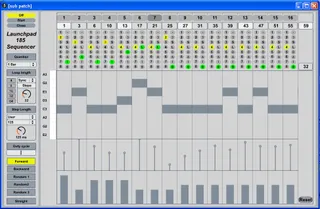
Launchpad 185 Sequencer
2011 december 17: new version 1.5.9. with better layout on t...
- Type
- MIDI Effect
- Author
- xanadu
- Version
- 1.5.9
- License
- AttributionNonCommercialNoDerivatives
- Live version
- 8.2.2
- Max version
- 5.1.8
- Downloads
- 3,374
- Updated
- 2011-12-17
Launchpad 185 Sequencer is a MIDI Effect for Ableton Live by xanadu, distributed as Creative Commons Attribution-NonCommercial-NoDerivatives. It targets Live 8.2.2 and Max 5.1.8. On maxforlive.com it has 3,374 downloads. First published 2011-11-16, last updated 2011-12-17. 23 user comments below.
New to Max for Live? Read what MIDI Effects do, what the AttributionNonCommercialNoDerivatives license means, how to install a device.
Description
2011 december 17: new version 1.5.9. with better layout on the Launchpad.
This sequencer is modelled after the Roland 185 Sequencer. It has 16 stages which can last for 1 to 8 steps. It can be used with a Novation Launchpad or just using a mouse. A 2 octave keyboard can be used too.
The Launchpad 185 Sequencer is a work in progress. Your remarks help me to develop it further.
Version 156 has a more intuitive layout on the Launchpad. Now you have more control on what information is displayed on the matrix buttons.
Choosing a Launchpad or <not connected> now allows for more than one LP 185 Seq to be active at once, but it does stress the system.
The sequencer's settings are now saved with the song.
Some help is included, though it's not a full manual yet.
Comments (23)
The sequencer will not take care of changing the meter while playing. It doesn't respond to jumping on the timeline while playing it just goes on counting the beats and looping when it has played all it's steps.
Velocity works, but the synth or the sampler must respond to it. Some presets dont't use velocity or aplly it to open or close a filter.
Else please describe your system.
Because of guys like you Launchpad is worth every single buck!!!
I promise will take care of saving / restoring the device with the Live set and an instructing manual.
Your user ratings are welcome now.
Sorry to hear the Launchpad 185 seq is not working well on your system. I suppose it's is a timing problem, but I can't reproduce your issues on my Windows XP system. What system are you on?
Cheers,
Xanadu
I think you really want to use my little sequencer, but helas without much luck. I'm still trying to figure out what is exactly your problem and what is causing it.
1. Are you using only 1 copy of Launchpad 185 sequencer in your Live song? At this time more than one copy is not tested and probably won't work.
2. When you mention 'tracks' do you mean the Ableton Live tracks or the 16 'stages' in the sequencer?
3. I think order of the initiatlization on your system be hust a little different than on my computer, resulting in uninitialized stages. I have uploaded a new version 132. This one has a better initialization worked out. Does this help for you?
4. Please upload your Ableton Line .ALS song file to [email protected] . Then I can try te recreate the problem at my own system.
Cheers,
Xanadu
Thanks for your explanation. I think I've got the bug now. Changing the pitch with the mouse *only* worked when the Launchpad was displaying the pitch. Since you are not using a Launchpad, your internal pitch setting was not opdated. In version 134 this is fixed.
By the way, this sequencer was made for use with a Launchpad, so it would be more fun if you could get one.
xanadu
Thanks for your explanation. I think I've got the bug now. Changing the pitch with the mouse *only* worked when the Launchpad was displaying the pitch. Since you are not using a Launchpad, your internal pitch setting was not opdated. In version 134 this is fixed.
By the way, this sequencer was made for use with a Launchpad, so it would be more fun if you could get one.
xanadu
I do plan to get a launchpad but i need to buy a few other things first.
-
3
S
L
D
A
1
0
refer too? They seem to affect the trigger of the notes over the period of time a given stage is active. But I'm looking for the actual term represented by the abbreviations used as I could not find a direct correlation on the pics I found of the Roland 185.
Thanks
Derrick
These are the effects:
0- Nothing happens
1- One note is played using it's own duration
A- On each step a note is played using it's own duration
D- A note is played during the whole stage
L- Legato mode. Previous stages with a D or L effect will wait to send their note-off MIDI signals until a stage with another effect than L is played. In the L stage a new note is played during the whole stage. This should be used in combination with a mono-synth.
S- A note is played on each step according to the 'Duty cycle' setting.
3- There are 3 notes played, dividing the stage in 3 equal parts
-- Nothinh happens.Anyone with a suggestion?
xanadu
But this Launchpad 185 Sequencer and my Launchpad Drum Sequencer really are my love babies.
If someone comes up with good ideas for effects I certainly try to implement them. Perhaps it would be nice to have more patterns that could be swithced by pushing a button.
Cheers,
xanadu
Both Novation products Launchpad and Nocturn work in the way you are suggesting. On the Nocturn I find this couter-intuitive: I want to see where I am, not where I can go. But on the Nocturn you can have more than 2 pages, leaving not much choice.
On my Korg nanoKey and Akai LPK25 keyboard a led lights up left for lower keys and right for higher keys. I like that.
So both methods are used on modern Midi devices. I think I can make this choice into a setup option in the next update.
I have my iPad for nearly two month. I bought the full featured Lemur app by Liine. It's incredible. I'm creating this 185 type of sequencer now for the Lemur. I think the touchscreen is a better fit for this sequencer.
xanadu
Thanks in advance for your help. Looks like a dandy wee tool!! :)
MB
Ableton 9.0.1
Max 6.1