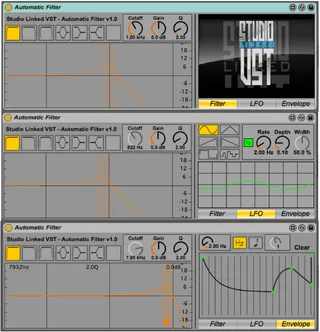
Automatic Filter
Automatic Filter is a free & simple-to-use graphical filter ...
- Type
- Audio Effect
- Author
- kevinkripper
- Version
- 1.0
- License
- AttributionNonCommercialShareAlike
- Live version
- 9.0.1
- Max version
- 6.1
- Downloads
- 2,703
- Updated
- 2013-04-18
Automatic Filter is an Audio Effect for Ableton Live by kevinkripper, distributed as Creative Commons Attribution-NonCommercial-ShareAlike. It targets Live 9.0.1 and Max 6.1. On maxforlive.com it has 2,703 downloads. First published 2013-04-17, last updated 2013-04-18. 5 user comments below.
New to Max for Live? Read what Audio Effects do, what the AttributionNonCommercialShareAlike license means, how to install a device.
Description
Automatic Filter is a free & simple-to-use graphical filter that can be controlled by an LFO or a customised Envelope. It has a friendly UI to make things really easy but, just in case, each parameter has a description in Live's Info View.
It was developed by Kevin Kripper for StudioLinked VST (http://studiolinkedvst.net). We hope you enjoy this device!
Comments (5)