Session Notes
Hi! The other day I had to write some notes within the Sessi...
- Type
- Audio Effect
- Author
- kevinkripper
- Version
- 1.0
- License
- AttributionShareAlike
- Live version
- 9.0.3
- Max version
- 6.1.1
- Downloads
- 5,174
- Updated
- 2013-05-23
Session Notes is an Audio Effect for Ableton Live by kevinkripper, distributed as Creative Commons Attribution-ShareAlike. It targets Live 9.0.3 and Max 6.1.1. On maxforlive.com it has 5,174 downloads. First published 2013-05-22, last updated 2013-05-23. 8 user comments below.
New to Max for Live? Read what Audio Effects do, what the AttributionShareAlike license means, how to install a device.
Description
Hi! The other day I had to write some notes within the Session and I realized that Live's notes/reminders system wasn't comfortable enough for me, so I've built this simple device to save with the Session any thought I could have.
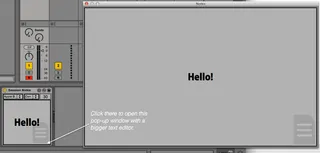
I added controls to change the font, the justification and the text size to make it more user configurable! Also if the standard space isn't enough for you, click on the lower right corner to open a pop-up window with a bigger text editor.
Comments (8)
But with my fav Ableton template the text is not clearly visible :(
https://i.snipboard.io/SDhE5l.jpg
Is it fixable in someway?