Clip Loop Monitor
It's my mod of "Clip Loop Monitor" by user Synnack (www.s...
- Type
- Audio Effect
- Author
- kevinkripper
- Version
- 1.4
- License
- AttributionShareAlike
- Live version
- 9.0.3
- Max version
- 6.1.2
- Downloads
- 1,905
- Updated
- 2021-06-21
Clip Loop Monitor is an Audio Effect for Ableton Live by kevinkripper, distributed as Creative Commons Attribution-ShareAlike. It targets Live 9.0.3 and Max 6.1.2. On maxforlive.com it has 1,905 downloads. First published 2013-05-20, last updated 2021-06-21. 13 user comments below.
New to Max for Live? Read what Audio Effects do, what the AttributionShareAlike license means, how to install a device.
Description
It's my mod of "Clip Loop Monitor" by user Synnack (www.synnack.com), currently hosted at http://www.maxforlive.com/library/device/1680/clip-loop-monitor
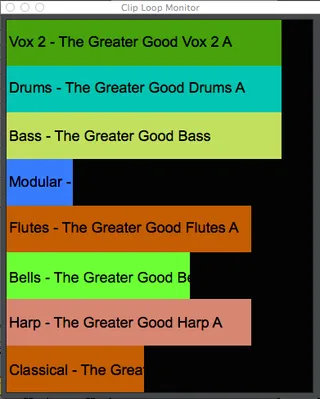
This device gives you a better display of the play position of the currently playing clips in 8 tracks you specify.
-------------------------------------------------------
What I've modified:
v1.4
- Fixed Clip Loop Monitor starting at the beginning of the sound file instead at the beginning of the loop
v1.3
- Keep the settings when closing/opening Ableton.
v1.2
- DEEP clean up of the code.
v1.1
- Converted into an audio device so you can drag it to the Master Track or any other Audio Track.
- Not only displays the name of the track but also the name of the clip.
- Each bar has the same color as the clip is representing.
- No need to refresh when adding a track or changing a clip, etc. It automatically refresh everything (track & clip name, clip color, track position).
- Added one more track, so now you can visualise the clips of 8 tracks per device.
-------------------------------------------------------
Usage:
1. Add the device to any Audio Track.
2. Select which tracks you want to monitor. If you don't it will default to tracks 1 - 7 which should be fine for most people's live shows.
3. Play some clips and see it shows you their status. Enjoy.
Comments (13)
So most of my clips show up as being played all the way through even though they aren't
Do you accept feature request? ;) It would be nice if this device can display total play time for clip. Very often i just forget about some playing clips set especially if the set consisting of short clips.
- option to resize the floating window would be great
- option to change the number of monitored tracks
I use Live for live performances and every inch on my MacBook monitor is valuable. The floating window now simply takes too much space. :-)
Brilliant device, thanks for making this!
Would it be possible to make it support group tracks as well?
If a group track is selected, the progress bar doesn't show.
Cheers!