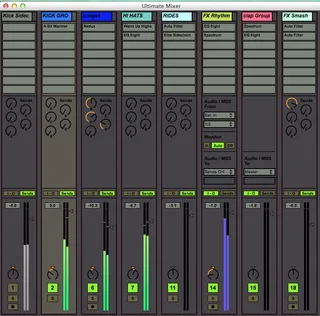
Ultimate Mixer
Ultimate Mixer is the best solution to expand your Ableton L...
- Type
- Audio Effect
- Author
- kevinkripper
- Version
- 1.1
- License
- AttributionNoDerivatives
- Live version
- 9.0.3
- Max version
- 6.1.3
- Downloads
- 5
- Updated
- 2021-06-21
Ultimate Mixer is an Audio Effect for Ableton Live by kevinkripper, distributed as Creative Commons Attribution-NoDerivatives. It targets Live 9.0.3 and Max 6.1.3. On maxforlive.com it has 5 downloads. First published 2013-04-27, last updated 2021-06-21. 42 user comments below.
New to Max for Live? Read what Audio Effects do, what the AttributionNoDerivatives license means, how to install a device.
Description
Ultimate Mixer is the best solution to expand your Ableton Live expirience. It is the floating mixer that was missing to use Live with a second monitor!
Music Radar's Review: http://www.musicradar.com/reviews/tech/kevin-kripper-ultimate-mixer-579338
-------------------------------------------------------
v1.1: http://youtu.be/WG_iBJlxuY8
- Deep code clean up
- Improved CPU consumption
- Improved boot time
- Improved UI
- New Logo
- React to Group Tracks
- Visualise which track is selected and select it from UM too
- Added dB display
- Added Session Notes
- Added Shortcuts (Pan, Notes, Tools)
- Added the cue knob and crossfader slider in the Master track
- Added hints and descriptions in Live's info box
- Replace ''auto resize'' for an automatic screen adaption
- Fixed live.meters showing a green line even though there was no audio in the track
v1.0: http://youtu.be/k24b2OTtyYQ
- Stretchable channels
- Live's skins adaptable
- Change the name and color of each track
- Inserts display
- Sends control
- I-O & Monitor control
- Add tracks (up to 50) and returns
- Stay-on-top
- Auto-resize depending on window size
- MIDI & Key Mapping
-------------------------------------------------------
For support, impressions, suggestions, please contact [email protected]
Comments (42)
thx
@xbitz, I have those devices (don't like them at all) and the state of the group tracks are not shown!! In fact, I have read the article and nothing is said about it............so
if u close a group that one hides the affected tracks (which ones are in the given group track)
"A track is visible if it is not a subtrack folded in. Hiding tracks be scrolling them out of view is something completely else."
Anyway I think the devices you posted, don't have that option as @hitchhikerX said...
what can i do?
1.i opened the mixer and all the faders were in the wrong position. (i.e. in the live mixer some are at 0dB , in your mixer they are 1cm beneath the line.)
2. it doesn`t properly update after adding, deleting tracks.........
i was patching my own mixer but i was struggling with exactly this problems and then i found yours and thought: wow, you did it. but now i have paid for a finished working patch and have the same problems as before.
and about the spectrum:
it`s really useless that the frequencies below 10 hz take up so much space as you should get rid of anything down there anyway.
sorry, i know it is hard work and you are very close but as soon as you aren`t there you should not sell it
all the best, andreas
1) The faders are like that because Live measure dB in a strange way, that is, they use a table of values instead of a normal logarithmic scale. I've found a polynomial that imitate quite well dBs and I'm going to add it to v1.1.
2) I don't know your set up, nobody have reported that issue, in fact here every track is updating just fine after adding, deleting or changing the position of tracks! (Live 9.0.3 with Max 6.1 and Live 8.0.4 with Max 6.0.8)
You have payed for an excellent work, that is going to be updated (with quite cool new features) for free in the next few weeks, so take it easy!
------------------------------------------------------------------------------
Change the scale of the spectrum to Linear if you don't wanna see frequencies below 10Hz, but every spectrum analyzer shows those frequencies.
------------------------------------------------------------------------------
Look, every software needs improvements. I've payed a lot of money for Ableton Live and it has a lot of flaws, which they try to fix in every update. The same here: I've updated 5 times Spectrum Analyzer S8 (and with each of them S8 has become a more powerful plugin) and I'm about to release Ultimate Mixer v1.1. So, chill and thanks for the bad add! But I just wanna say that whatever you say doesn't change the fact that this is a great piece of patching that is going to be reviewed in the next issue of Computer Music Magazine.
if u can please add the feature that highlight the selected channel.
it will be great for people that using controllers for mixing :)
keep up the great work!!!!
and yes on all spectrum devices those freuquencies are shown , but soo big?
btw.: i didn`t want to write you here but i haven`t found a email address.
sorry it must be my english skills that i`m not able to write it in the right words which aren`t too rude
And also, it is (with my facebook too) in "License.txt", which comes inside both UM and S8 .zip file.
About the Analyzer, yes, that big. Have you tried Ableton's native Spectrum Analyzer? Please, if you don't, check out how big frequencies from 0Hz to 80Hz are displayed!
thank you very much :)
andreas, your point is somehow valid about the size of the frequency range between 10 and 100 but in these 90 hz we are dealing with more than 2 octaves and when mixing this is the part of the spectrum that demands the most precision, just for monitors tuning it's worth the size.
Not alot of instruction in the zip file.
I installed it and when i put in on the master out, all i get is the device with logo in the bottom. I hit 2 and a window pops up but i dont see the mixer/channels.
I'm new to Max 4Live, so maybe I'm missing something...
please help.
thanks,
chuck
here is my impression:
* its slow, spectrum drawing is very slow here.
If you lie to display a kick and a snare together, the spectrum display just flashes very short, but its very hard to see anything usefull.
Probably add a kind of falloff time ?
But for 5 bucks its ok ;)
Cheers!
I've tried loading it on audio tracks, midi tracks and also the master with the same result. This happens on new live sets with nothing in them except the default.
Do let me know how I can send you the crash log from OS X as I am not allowed to post more than 5000 characters here. Thanks!
Can you launch a plug-in easily now from UM?