- Type
- Audio Effect
- Author
- mothergarage
- Version
- 1.01
- License
- None
- Live version
- 9.0.4
- Max version
- 6.1.3
- Downloads
- 640
- Updated
- 2013-07-06
MultiMapper is an Audio Effect for Ableton Live by mothergarage, distributed as freeware, with no license specified by the author. It targets Live 9.0.4 and Max 6.1.3. On maxforlive.com it has 640 downloads. First published 2013-07-05, last updated 2013-07-06. 7 user comments below.
New to Max for Live? Read what Audio Effects do, how device licenses work, how to install a device.
Description
For version 1.02 and later please head over to http://www.maxforlive.com/library/device/1791/multimapper
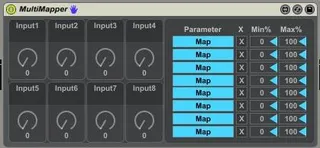
8 dials you can map to any midi-mapable control in Live. Looks like the eight macro devices you usually get. Just a tweaked version of the Multimap device which comes with M4L, so credits go there.
Version 1.01: Added dynamic naming of the dials. Thanks to Lokua.
Version 1.02: Added preset saving and randomizing.
Known Issues: Push doesn't display thedynamic names.
Comments (7)
http://lokua.net/tech/dynamic_shortname.amxd
Or without looking at the linked device, send the message
_parameter_shortname newnamehere
You'll need to edit the mapping abstraction and include an outlet to send the mapped parameter name out.
if you need any more help email
lokua(at)lokua(dot)net
cheers
Thanks a lot for the heads up!!
So - lek, expect a new version soon ;)
I have been trying to look into how to do this myself but it is really hard to find any conclusive info on the subject.
It sounds like it should be a really simple thing...but I have a feeling it isn't?