Automation Gate
A gate for your automations, opened by a MIDI on message and...
- Type
- MIDI Effect
- Author
- Because789
- Version
- 1.0
- License
- None
- Live version
- 9.0.4
- Max version
- 6.1.3
- Downloads
- 1,081
- Updated
- 2013-07-09
Automation Gate is a MIDI Effect for Ableton Live by Because789, distributed as freeware, with no license specified by the author. It targets Live 9.0.4 and Max 6.1.3. On maxforlive.com it has 1,081 downloads. Published 2013-07-09. 1 user comment below.
New to Max for Live? Read what MIDI Effects do, how device licenses work, how to install a device.
Description
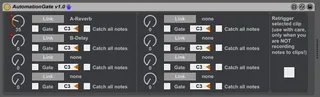
A gate for your automations, opened by a MIDI on message and closed by the MIDI off message.
Usage:
1. link a parameter to the according knob of the device by first clicking on "Link" and then on the parameter (the parameter will not be grabbed, you still can manipulate it by itself)
2. choose the note you want to trigger the gate (activate "Catch all notes" if any note should open/close the gate, overlapping notes will be ignored)
3. automate the knob on the device either by an other device like an LFO or by recording an automation curve to a clip
4. the automated knob will send its values to the linked parameter when you play the according MIDI note
Don't use the "Retrigger selected clip" button when you record notes to clips (it will end in a loop according to your quantization setting)!
Release notes:
----------------
v1.0
- initial release
Comments (1)