Push Color Picker
This device makes it possible to set the colors of clips and...
- Type
- Audio Effect
- Author
- Because789
- Version
- 1.1
- License
- None
- Live version
- 9.0.6
- Max version
- 6.1.4
- Downloads
- 1,599
- Updated
- 2013-11-06
Push Color Picker is an Audio Effect for Ableton Live by Because789, distributed as freeware, with no license specified by the author. It targets Live 9.0.6 and Max 6.1.4. On maxforlive.com it has 1,599 downloads. First published 2013-11-04, last updated 2013-11-06. 2 user comments below.
New to Max for Live? Read what Audio Effects do, how device licenses work, how to install a device.
Description
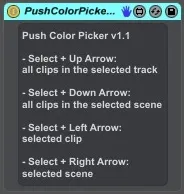
This device makes it possible to set the colors of clips and scenes from Push. Just load the device to a random place in your set and the following button combinations are available (only in Session mode):
- Select + Up Arrow:
Choose a color for all clips in the selected track.
- Select + Down Arrow:
Choose a color for all clips in the selected scene.
- Select + Left Arrow:
Choose a color for the currently selected clip.
- Select + Right Arrow:
Choose a color for the currently selected scene.
Limitations:
- The device assumes that Push is running and properly set up/connected to Live.
- When you release the Select button before releasing one of the Arrow buttons, the button matrix gets stuck in the color chooser mode. To get back to the default mode just press Select + one of the Arrow buttons again and make sure you release Select after releasing the Arrow button.
- The clip color table from the Push remote scripts is used which isn't always very accurate.
- The device only works in Session mode in Push default mode (User mode scripts like PXT-Live are not affected)
Release notes:
----------------
v1.1
- changed button combinations
- added possibility to choose a color for all clips in the selected scene and for the selected scene itself
- removed "Clip" from device name
- major clean up of the internal logic
v1.0
- initial release
Comments (2)