Scene Transposer
This device allows you to transpose every clip in the select...
- Type
- MIDI Effect
- Author
- Because789
- Version
- 1.0
- License
- None
- Live version
- 9.0.5
- Max version
- 6.1.3
- Downloads
- 1,957
- Updated
- No Updates
Scene Transposer is a MIDI Effect for Ableton Live by Because789, distributed as freeware, with no license specified by the author. It targets Live 9.0.5 and Max 6.1.3. On maxforlive.com it has 1,957 downloads. Published 2013-08-07. 6 user comments below.
New to Max for Live? Read what MIDI Effects do, how device licenses work, how to install a device.
Description
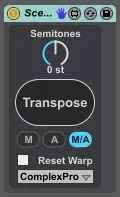
This device allows you to transpose every clip in the selected scene by semitones.
Features:
- Transpose clips in the SELECTED scene.
- You can choose if you want to transpose only midi clips (M), only audio clips (A) or both (M/A).
- MIDI clips are transposed destructively, the notes in the clips themself are moved to the new pitch.
- Audio clips go through a check if Warp is on or not. If not it will just transpose the clip. If it's on you can reset the Warp mode by selecting a mode and checking the Reset Warp box before you click Transpose.
Use with care! Make sure you save your work before you use this device.
Based on Transpose MMC 1.0 (http://www.maxforlive.com/library/device/1852), basic idea by Ableton forum user shadx312.
Comments (6)
I have one small problem: when I map the Transpose button to a Note Value on my controller, it only alternates between On and Off rather than reacting like it would when you click on it. My FCB1010 somehow can't send CC messages that trigger actions on and off (like a click), so I need to use Note values instead (like for Looper). Do you think it would be possible to make the Transpose button react as it should with Note Values? That would make my live performance so much easier. Thanks! :)
great device!
Is it possibe you do a version which changes the pitch of all clips (even unselected) of one audio track?
I need this for kind of harmonic mixing with a lot of audioclips in a live project in which the key is improvised.
I would be really glad!!!
Greets peter
p.s. better would be without transpose button (just a fader for Midi control)
Better would be without transpose button and button + -... Please Thanks! :)