- Type
- MIDI Effect
- Author
- 12RT2
- Version
- 1.0
- License
- None
- Live version
- 9.0.6
- Max version
- 6.1.4
- Downloads
- 1,396
- Updated
- 2013-11-09
Slicer is a MIDI Effect for Ableton Live by 12RT2, distributed as freeware, with no license specified by the author. It targets Live 9.0.6 and Max 6.1.4. On maxforlive.com it has 1,396 downloads. First published 2013-11-07, last updated 2013-11-09. 10 user comments below.
New to Max for Live? Read what MIDI Effects do, how device licenses work, how to install a device.
Description
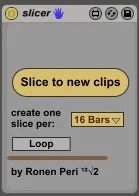
Slice clip to new clips.
When you want to slice your MIDI clips, or audio; and also save your warp processing unlike the "Slice to a new midi track" function.
Instructions:
Put the device on the wanted clip's track, set the clip's start and end markers (the loop brace isn't enough) to select the part you want to cut (like when you cropping audio for the "slice to midi" func.). Now make sure the clip is selected, choose to slice per 16 bars 8, 4, 2, 1 bars, half a bar, or a single beat, and press the Slice button.
When slicing into slices greater than 1 bar, make sure your start marker is on the beat grid. If a smaller size is chosen, the first slice will be shortened to fit the grid.
Want the new clips to be looped? Just turn the "loop" button on. It gonna be hard to do it later if the clips aren't looped because the loop braces are not snapped to the start/end markers when the loop is off (limitation -in this case- of max).
[Goes Perfectly with the Sequenscene device, if you want to launch those clips using a drum rack, with push, for example...
http://www.maxforlive.com/library/device/1984/sequenscene ]
Comments (10)
It's fantastic, big THANKS!!!
I'll be happy to make it happen, but it seems the function for this in the max4live api (the platform which gives the control over live's parameters) has a bug, when using beat units smaller than 1/4.
Furthermore, this is actually quite risky for the ordinary user, as it creates lots and lots of clips (8 clips per bar at 1/8, 16 clips at 1/16), and without noticing you can overload your project. I can solve it by creating a box to specify a limit of clips to be created, but as I said, this feature will not function well for now.
Meanwhile, you can stretch the clip to twice the length before slicing, using the [repitch] algorithm, and then shrink it back. This way you can get 1/8 pieces. If you stretch it 4 times the length you get 1/16.
I'm glad you're enjoying the patch.
Ronen