Parameter Sequencer
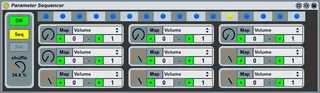
This device lets you save snapshot of parameters on each ste...
- Type
- MIDI Effect
- Author
- Bert
- Version
- 1.0
- License
- None
- Live version
- 9.0.6
- Max version
- 6.1.4
- Downloads
- 1,560
- Updated
- 2013-11-11
Parameter Sequencer is a MIDI Effect for Ableton Live by Bert, distributed as freeware, with no license specified by the author. It targets Live 9.0.6 and Max 6.1.4. On maxforlive.com it has 1,560 downloads. Published 2013-11-11. 4 user comments below.
New to Max for Live? Read what MIDI Effects do, how device licenses work, how to install a device.
Description
This device lets you save snapshot of parameters on each step of a 16-step-sequencer. So when you hit play in Live, you get rhythmical changes of a parameter value.
There is also a Note-Mode, which lets you trigger the snapshots via note-input.
How it works:
- Link one or all nine of the devices dials to any of lives parameters, by clicking on "Map" and then clicking the desired parameter in live. Set the parameters range (default 0 - 1).
- Set the devices dials for your first snapshot. Shift + click on the desired step (grey dot) to save the snapshot on a certain beat. (this dot turns blue)
- Do so for further beats/settings. If you leave one dot grey, the previous snapshot will stay until the next snapshot is recalled.
- Set the Shuffle (Swing) amount.
Note-Mode:
- Set the devices dials as desired. Switch the device to Note-Mode (second button on the left side).
- Make sure the device receives Midi notes (just like every other MIDI effect or Instrument)
- Activate the "Set" button below, so that it turns green.
- Press any key to link it to this snapshot.
- Proceed this way with further notes/snapshots.
- Works also with the Piano-Roll as note input.
This is version 1.0 of the device. So I am sure there's room for improvement, so please let me know if you have any ideas!
For feedback and suggestions: [email protected]
Comments (4)
I have some advices if you want to make a new version with improvements for a better note entry sequencing (that a like more):
- I will use 1 mappable slot only to avoid confusion, instead of 9, with its own sequencer bar.
- Would be more intuitive to have knobs on each step like this device: http://www.maxforlive.com/library/device/129/note-trigger-step-sequencer
- Assignable notes
- Would be nice to have a 'tempo' parameter to decide the speed of the sequence, midi mappable.
- The off button should unlock the parameter too for live tweaking.
I had Live slowing down when i mapped a slot to a volume track and another one to a reverb wet/dry knob; don't know why...
Let me know if you like these ideas.
cheers
Some good points, I will definetly try to implement.
- one mappable slot makes sense especially in conjunction with knobs on each step!
- I dont understand, what you mean with assignable notes?
- A tempo parameter would be easy to implement, if it was just multiplying/dividing lives tempo. Well, an indipendent (internal) clock wouldn't be so hard also :). I'll try it!
One additional idea of mine was to make it possible to morph the parameter value from one step to another.
keep it comming!
all the best
bert
You can see an example of what i mean in this device in the box called note:
http://www.maxforlive.com/library/device/1690/momentary-8-pro
If you would like to have more slots you can consider one row with knobs for each slot :)
dan
You can see an example of what i mean in this device in the box called note:
http://www.maxforlive.com/library/device/1690/momentary-8-pro
If you would like to have more slots you can consider one row with knobs for each slot :)
dan