MIDI File One Shotter - easy
This surprisingly useful doohickey was designed for my own n...
- Type
- MIDI Effect
- Author
- manysounds
- Version
- 1.0
- License
- Attribution
- Live version
- 9.1.62
- Max version
- 6.1.5
- Downloads
- 519
- Updated
- 2013-11-13
MIDI File One Shotter - easy is a MIDI Effect for Ableton Live by manysounds, distributed as Creative Commons Attribution. It targets Live 9.1.62 and Max 6.1.5. On maxforlive.com it has 519 downloads. First published 2013-11-12, last updated 2013-11-13.
New to Max for Live? Read what MIDI Effects do, what the Attribution license means, how to install a device.
Description
This surprisingly useful doohickey was designed for my own nefarious purposes, namely for firing off led sequences on a Quneo.
I was feeling limited by the fact that I could fire off MIDI clips to make my LEDs go blinky blinky BUT couldn't run more than one sequence at the same time unless I went through the process of creating a bunch of combined MIDI clips in Ableton and... Well basically it was limiting the dynamic capabilities of the potential performance vectors.
Of course, since I started futzing with it I've been using it to fire off all kinds of stuff, not just LED blinky blinks. Great for drum breaks?
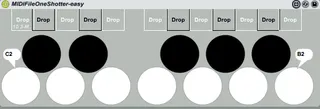
So, here it is. Export your favorite MIDI clips as MIDI0 files -or get .mid files from wherever. Drag and drop them onto the keys.
Grats! You now have a C2-B2 sequence blaster. Follows tempo!
This is the "easy" version for a number of reasons. 1-It's fixed at one octave and the MID files only plays once. 2-Upcoming "hard" version will be full range drum and sustain loop? 3-I just slapped it together
edit: Here's a more advanced one, as it its:
http://www.maxforlive.com/library/device/2018/midi-file-one-shotter-too