- Type
- MIDI Effect
- Author
- godbeat
- Version
- 31.60
- License
- None
- Live version
- 9.0.6
- Max version
- 6.1.4
- Downloads
- 594
- Updated
- 2014-06-03
Roland Aira TB- is a MIDI Effect for Ableton Live by godbeat, distributed as freeware, with no license specified by the author. It targets Live 9.0.6 and Max 6.1.4. On maxforlive.com it has 594 downloads. First published 2014-04-05, last updated 2014-06-03. 3 user comments below.
New to Max for Live? Read what MIDI Effects do, how device licenses work, how to install a device.
Description
ChangeLog
1.6 Version
- You can save presets (Shift + Bank you will save) this presets will be saved with your ableton project and reloaded when the project is open again. 16 presets
- A randomizer!, you can make a lot of fun sounds.. and save it with the preset bank
- Some bugs repaired (bank select, program change, etc...)
- Reordered layout and some other minor stetic details
A couple of things more to implement but i no have so many time
1.4 Version
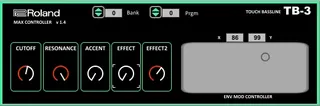
- Added a 2 Effect button...what does it mean?
Welll, some effect have a 2 effect.. no like the main effect but you can control it to twist a bit the sound... an example
~ Select the A10 sound and run the seq on the Hardware
~Put the plugin on a Live channel and control it.. if you turn up the 'Effect 2 Knob' you can hear a little flange effect (the main effect is a delay)
~ Select the A04 sound and run the seq on the Hardware
~Put the plugin on a Live channel and control it.. if you turn up the 'Effect 2 Knob' you can hear a little ring mod effect (the main effect is a reverb)
1.2 Version
- You can select the bank and the program, still needs to reset the parameter (working on it)
- Control Over X-Y EnvMod parameters
- Nice Layout :-)
Still work in progress
Comments (3)
While also getting inspired by nerk (TB-3 and TR-8), I will continue to see how to make a preset manager for TB-3 straight from M4L, once I will get a decent result I will let you know.
cheers
http://www.roland.com/support/article/res/faq/63081214/TB-3_MIDIImpleChart_e01.pdf
andy