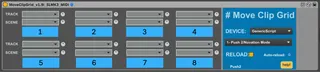
Move Clip Grid - Launchpad - Push - move red box
Update 5 Nov 2025 This device is no longer work. Ableton ...
- Type
- MIDI Effect
- Author
- sharp
- Version
- 1.9.1
- License
- AttributionNonCommercialShareAlike
- Live version
- 9.0.6
- Max version
- 6.1.4
- Downloads
- 3,451
- Updated
- 2025-11-05
Move Clip Grid - Launchpad - Push - move red box is a MIDI Effect for Ableton Live by sharp, distributed as Creative Commons Attribution-NonCommercial-ShareAlike. It targets Live 9.0.6 and Max 6.1.4. On maxforlive.com it has 3,451 downloads. First published 2014-03-31, last updated 2025-11-05. 50 user comments below.
New to Max for Live? Read what MIDI Effects do, what the AttributionNonCommercialShareAlike license means, how to install a device.
Description
Update 5 Nov 2025
This device is no longer work. Ableton changed something with push or other controllwrs, I can't remember. Full details on gumroad.
Sep 2024: This device does not work with Live 12 (PC & Mac) and Push 2 or Push 3 unfortunately. Ableton changed the control scripts, and it doesn't look like there is a simple fix (search for "Push2UseLegacyScript" here: https://www.ableton.com/en/release-notes/live-12-beta/)
I think it still works with launchpads and other controllers, Push 2 seems to be the problem.
==
You can use MCG with L12 and P2 if you add:
-Push2UseLegacyScript
to the Options.txt file. Unfortunately this means you can't use some of the new ClipView display for Push 2 in Ableton 12, but it seems for now you can't have both.
====
More info: https://www.facebook.com/groups/clyphx.pro/posts/1633282534122599/
Update 19 June 2022
----
Updated to support new Novation devices:
- Novation SL MKIII 49
- Launchpad mini
- Launchpad Pro
Device now supports 200+ tracks.
This page contains a MIDI device demo/trial version. Full version available on Gumroad as Audio and MIDI, with 8 presets/slots: https://gumroad.com/l/moveclipgrid
--------------------
Comment 3 May 2021: Version 1.9 works on Live 11.
Video here: https://www.youtube.com/watch?v=LccFgizaJto
-- Update v.19 (23 June 2019)
• Selected Control Surface (Push1/2/APCE etc) is saved and loaded correctly, before it had to be selected from the list again. The patch waits 5 seconds to make sure Push has loaded before recalling the setting.
• Previously scene names that only contained numbers wouldn't work, e.g. '4' now any scene name will work (now scene names can be a number only)
• Previously scene names with spaces didn't work, now they do (now scene names can contain spaces).
• Fixed a bug that prevented sessions with a high number of scenes from working, i.e. when there was a high number of scenes, the patch wouldn't workl
• Track and Scene updated from limit of 9999 tracks
As I've put quite a bit of work into this patch and I don't use it for my own live set, I am asking for a small amount to go towards a beer, or some nice biscuit. LEt me know if there's any issues.
--Updated v1.8 (2 May 2016)
Now supports Live 1.6, Push 2 (and Push 1) - BIG THANKS to @atomictag's patch! I've used elements of this to get and move the red session ring after some changes were made to accessing this in Live (and for Push2)
--Updated v1.6 (1 May 2015)
* bugs fixed
--Updated v1.4 (23 Feb 2015)--
* Removed limitation for number of scenes and tracks
* Preset/storage box 3 is now working
Move the control surface red box to up to 8 preset locations!
This device allows you to store 8 preset locations inside of your session that can be jumped to with a single click/midi mapped button.
Choose track and scene name for each preset, then press the button to jump to that location.
See video for quick overview, or click help button inside of the patch for setup details.
Limitations:
- track/scene names cannot be duplicates
- all folded tracks will be unfolded
- there is a small bug where the device won't re-load a preset correctly, if that preset is the same track that the move clip grid device is on, the track dropdown will show 'This track'. To avoid this, use the device on it's own track.
- it's a midi device and should be on it's own track. There is an audio device version available if needed, contact me.
@atomictag's patch is here:
http://www.maxforlive.com/library/device/3525/session-ring-control
Comments (50)
It's making my life so much easier.
Not only did you make a great Max for Live Script, but it is also very clean and straightforward.
Wishing you the best.
I have a dj session with millionz of tracks and scenes, so when I open the menu to select a scene, the list of scenes is split into two columns... and apparently any scene listed in the second column (the second half of all of my scenes) will not work. I push the button and it just will not navigate to it. anything in the first column works fine tho.
@djzach - do you have more than 666 scenes, or 999 tracks? either way I think I have fixed this bug, new device uploaded.
@upow1234 - new device uploaded, hopefully track 3 works now.
s --selected_control_surface has no kabel to Select_control_surface
and
autopattr ?
i hope this gets updated as i have been looking for something just like this. hopefully you can also load two or more instances to be able to have more that 8 preset clip view jumps
It was working fine on Live 9.2.3 and it's so perfect on stage !!!
But it doesn't work with LIVE 9.5 !
Will you update your device ?
It's so helpfull !!!!!!
Thank's !
Thanks for the feedback, didn't realise people were using this so much.
I will update for Live 9.5
Please send any error messages to jsharp seven-the-number at gmail com
Thank you so much !
Your device is a key !!!
I'll send you a message if a see any message, but the thing is that there is just nothing happening.. :-/
Hope you'll get it !
:)
I will updatefor Live 9.5 at he weekend.
I'll also check Push 2 functionality
There was a change to some back end settings/configuration, so this device no longer works.
From doing initial research, apparently this Isotronik device has similar or the same functionality. It's not free, AND I haven't tried it myself - it is very different to the patch I made. I will update if I find a solution, but I don't see anything likely at this stage.
http://isotonikstudios.com/isotonik/launchsync-series/
I'm sorry you can't fix it...
Hope you'll do that one day !
Many thank's for what you've done, and I will come here often to see if you had fix it !
Keep the faith !
:-)
I'm going to see what the other plug in does... (the isotonik thing)
All the best for you !
I'm sorry you can't fix it...
Hope you'll do that one day !
Many thank's for what you've done, and I will come here often to see if you had fix it !
Keep the faith !
:-)
I'm going to see what the other plug in does... (the isotonik thing)
All the best for you !
I'm sorry you can't fix it...
Hope you'll do that one day !
Many thank's for what you've done, and I will come here often to see if you had fix it !
Keep the faith !
:-)
I'm going to see what the other plug in does... (the isotonik thing)
All the best for you !
:-)
Thanks to @atomictag for using parts of his code
You did it !!!
Thank's to all of you !!!
:-)))))
thanks!
Unfortunately not, unless you routes the Midi out and back in to control the Midi map buttons.
- new design, last controller recalled on load, scene name bugs fixed.
I´m very sad. Device doesn´t work with Live_11 and my push_2 - Any other experience?
cheers
Can you describe what's happening? Did you use the device before in Live 10 ok?
Your device is amazing, but I get issues, if I wanna jump to more than track 128 (right side). Are there some limitations?
In scenes (down) I`ve tried only till 800 and there`s all fine.
Is there a possibility to jump to more than 128 tracks (right)?
I have just tested the device with Live 11 and Push 2 PC/Win, all working fine. Here's a video. If you right click on the title of the max device then select 'Open Max Window', then take a screenscot maybe we can work out the issue. Did it work before? Have you changed anything else in your set up?
Live 11, Move Clip Grid (v1.9) Working -
https://www.youtube.com/watch?v=LccFgizaJto
I just tested version 1.9 of Move Clip Grid on Live 11, Push 2, Win/PC and it works with 200 scenes.
Have you changed anything else in your setup? Did it work before?
If you right click on the title of the max device then select 'Open Max Window', then take a screenscot maybe we can work out the issue. Did it work before? Have you changed anything else in your set up?
200+ scene test video:
https://youtu.be/yMEF3rUZQmg
Thank you for your answer :)
Down the Scenes I`ve tested till 800+ all fine. But my issues are with 200+ Tracks (going right not down)
https://streamable.com/qkghiq
I just buy the full version.
It seems that it can not work after 130 tracks with the midi device. The audio device doesn't work at all.
I am on live 11 on windows.
Can you tell me more about this problem?
I really hope we can find something to resolved it because your product is absolutely wonderfull.
Thank you for your help
I won't be able to look at a fix until next weekend 7 May. I don't know what the problem is unfortunately. I will refund in the meantime.
@Ramses - sorry I think I missed your message, it seems you have the same problem as Vinch02.
I will try and apply the same fix for scenes to tracks.
Keep the bugs coming in please, it makes the device better.
I`ve thought that this issue will be lost.
Thank you so much, for bugfixing. Now it works!
But one issue is left, after jumping to the marked Track/Scene, the red grid is freezed always on Master-Track, when I move the red grid manual with my controller to one side. After 2 till 3 moves, red grid comes back to the marked track after jumping again.
You can see it in the video below.
Using Akai APC40 MKII
I hope that this issue can be solved too =)
https://streamable.com/bmqdpp
I hope, it will be fixed soon =)
Looking very forward for the powerful final of the device :)
Interesting, I will check, it sounds like a bug. Can I just check:
You're updating the drop down list.
Then you select a track.
Then when you trigger that preset it goes to the track BUT the scene always go to the first scene.
You want it to remain on the scene it is already on.
I never considered this option. It would be possible to make an update that does this. I don't have a lot of time at the moment, but perhaps I can try and have a look (or find a simple solution).
couple of questions.
1. How big is your live set, how many scenes and how many tracks?
2. Are you using this for DJ work, or a different type of live performance?
thanks
Ableton changed sonething with control surfaces.
Sep 2024: This device does not work with Live 12 (PC & Mac) and Push 2 or Push 3 unfortunately. Ableton changed the control scripts, and it doesn't look like there is a simple fix (search for "Push2UseLegacyScript" here: https://www.ableton.com/en/release-notes/live-12-beta/)
I think it still works with launchpads and other controllers, Push 2 seems to be the problem.
==
You can use MCG with L12 and P2 if you add:
-Push2UseLegacyScript
to the Options.txt file. Unfortunately this means you can't use some of the new ClipView display for Push 2 in Ableton 12, but it seems for now you can't have both.
====
More info: https://www.facebook.com/groups/clyphx.pro/posts/1633282534122599/