Roland AIRA TB-3 Remote
This is a remote device for the Roland AIRA TB-3 allowing yo...
- Type
- MIDI Effect
- Author
- nerk
- Version
- 1.0
- License
- None
- Live version
- 9.1.1
- Max version
- 6.1.4
- Downloads
- 2,959
- Updated
- No Updates
Roland AIRA TB-3 Remote is a MIDI Effect for Ableton Live by nerk, distributed as freeware, with no license specified by the author. It targets Live 9.1.1 and Max 6.1.4. On maxforlive.com it has 2,959 downloads. Published 2014-04-06. 3 user comments below.
New to Max for Live? Read what MIDI Effects do, how device licenses work, how to install a device.
Description
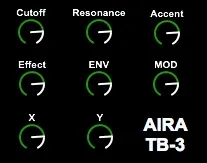
This is a remote device for the Roland AIRA TB-3 allowing you to record modulations using Push, the APCs or any other controller.
I found out about the (undocumented) CCs more or less by accident, so there might be more. Let me know in the comments if you discover any new ones i should add to this.
Available parameters:
Cutoff
Resonance
Accent
Effect
ENV
MOD
X
Y
Comments (3)
While building my TB-3 M4L, I discovered your posts on TB-3 and TR-8.
Regarding the TB-3, I also got some inspiration from "godbeat" on this web site; he found a way to navigate through the TB-3 sounds using CC0 and PGM.
I am now searching a way to save my TB-3 configurations (all CC + sound) within a Live MIDI clip (currently I could store and recall presets but from M4L GUI but I need to integrate that with Push encoders).
I will let you know what I come up with.
Thanks for sharing your patches.
Braindub
cheers
http://www.roland.com/support/article/res/faq/63081214/TB-3_MIDIImpleChart_e01.pdf
andy
One thing - on Ableton PUSH when in the device mode the 8 Preset POTS across the top for the device are great but the 5th PATCH for ENV (which is a key one I think) seems to be missing.
So PUSH offers up
1 - Cutoff
2- Resnance
3- Accent
4 - Effect
5 - IS BLANK BUT WHERE ENV SHOULD BE??
6 - Mod
7 - X
8 - Y
I fixed it fairly easily - you just need to go and edit the properties for ENV and change the Automapping Index from 2 to 5 and save that off and it fixes it.
Very chuffed - may be worth a update it you have a second