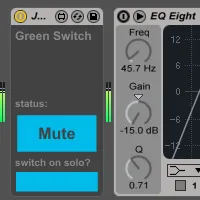
Green Switch MIDI
New in this version: Big internal reorganization for greater...
- Type
- MIDI Effect
- Author
- JGJP
- Version
- 6.0
- License
- Attribution
- Live version
- 9.1.6
- Max version
- 6.1.9
- Downloads
- 3
- Updated
- 2015-02-28
Green Switch MIDI is a MIDI Effect for Ableton Live by JGJP, distributed as Creative Commons Attribution. It targets Live 9.1.6 and Max 6.1.9. On maxforlive.com it has 3 downloads. First published 2014-11-22, last updated 2015-02-28. 7 user comments below.
New to Max for Live? Read what MIDI Effects do, what the Attribution license means, how to install a device.
Description
New in this version: Big internal reorganization for greater stability and is much better with bigger Live sets that take longer to load
Green Switch is a Max for Live device that automatically turns off all devices within a track when that track is deactivated (i.e. muted), saving you CPU usage and money spent on electricity, along with a little bit of the planet along the way.
To use a Green Switch, simply place it in your track. When the track is deactivated, it will turn off all the track devices. When the track is reactivated, it will restore all devices to their previous states, so any devices that were off before will still be off but any devices that were previously on will be turned back on.
Green Switch v.2 includes an option that accommodates Ableton's solo function, turning off all devices of all tracks except the track that's soloed.
Green Switch v.3 adds a function to turn off all devices within a track without muting the audio.
If your track is already deactivated when you insert a Green Switch, it will automatically turn all your devices off to reflect the track state, but will restore your devices when the track is activated.
There is a MIDI version for MIDI tracks and an audio version for audio tracks.
New in v.6: Improved interaction with Ableton undo queue, you can now undo Green Switch actions, though to do this you need to press ctrl+z or cmd+z a few times in rapid succession, it doesn't work if not done quickly. v6 solo switch functionality is not compatible with previous versions. If there are any bugs please let me know.
Comments (7)
Butv somtimes the plugin crash like that :
I have load the plugin in all my midi channels with the "switch on solo ?" activated.
But arround 5 minutes of use when I solo a channel, the plug in switch off all my midi instruments in my midi channels... And I have to switch on manually all the instruments/effetcs etc. in all my midi channels...
Sorry for my baaaad english.
Can you have any issue for that ?
Are you using the latest version of the device?
If so, can you tell me what happens when you try an older version?
I haven't tested it with Live 9.2 yet so that may also be an issue..
If you want, you can email me through the contact form on my site and I'll try to solve your problem.
Cheers,
J
Do you think that it would be fixable on next version?
Otherwise, awesome work!
However there is one thing which was not working, when I tried:
Let's say that I have grouped a midi and a audio track and I them switches to their corresponding tracks.
If I deactivate the group bus-track the switches won't follow that deactivation but if I deactivate each track in the separately in the group, they will follow and deactivate the devices on the track.
Question: Would it be possible to make it work for the group bus-track too? - so them switches would follow group bus-track deactivation?
Thank you very much and great job.
Hi, I'm the author JGJP, thanks for your comment.
Unfortunately I'm not maintaining my devices anymore, and this feature of checking the status of the parent group may or may not be possible with M4L's implementation. I would recommend having a look through the documentation or asking around on Max MSP's forums for help.