Highest note Lowest note MIDI filter
This Max for Live device allows you to process MIDI streams ...
- Type
- MIDI Effect
- Author
- JGJP
- Version
- 1.0
- License
- AttributionNonCommercial
- Live version
- 9.1.5
- Max version
- 6.1.8
- Downloads
- 3
- Updated
- No Updates
Highest note Lowest note MIDI filter is a MIDI Effect for Ableton Live by JGJP, distributed as Creative Commons Attribution-NonCommercial. It targets Live 9.1.5 and Max 6.1.8. On maxforlive.com it has 3 downloads. Published 2014-11-11. 6 user comments below.
New to Max for Live? Read what MIDI Effects do, what the AttributionNonCommercial license means, how to install a device.
Description
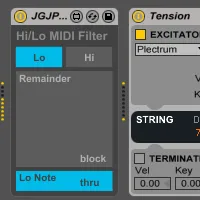
This Max for Live device allows you to process MIDI streams and separate out the lowest or highest note out of several simultaneously held notes.
The Hi/Lo switch allows you to choose whether to separate the highest note or lowest note and the interface will change to reflect this.
The 2 big buttons labeled Remainder and Lo Note/Hi Note allow you to toggle the throughput allowing 6 possibilities:
All notes thru
Highest note only
All notes except the highest note
Lowest note only
All notes except the lowest note
No notes thru
Comments (6)
I have midi coming into 4 channels of live but I cannot get the notes to split 1 > 2 >3 >4 across those channels.
the first 2 are ok but after that it doesnt seem to work.
hard to explain, but im trying to split chords on input (divisi)
is note (root) channel 1 (2nd) channel 2 etc.
I'm not really sure what you're trying to do, if you're trying to split the data based on the chord, you might need to have several Hi/Lo MIDI filters one after another..
To get the root, use one set to only let lowest note through
To get the next note up, use 2 in series set to only let lowest note through
To get the highest note, use one set to only let the highest note through
To get the note below the highest note, use 2 in series both set to only let the highest note through.
Hope that helps, if you have any further questions please email me through the contact form on my site, this will ensure a much faster response since we get no notifications here on maxforlive.com
To get the root, use one set to only let lowest note through
To get the next note up, use 2 in series whith the first one set to let the remainder (everything except the lowest note) through and the 2nd one set to only let lowest note through
To get the highest note, use one set to only let the highest note through
To get the note below the highest note, use 2 in series with the first one set to let the remainder (everything except the highest note) through and the 2nd set to only let the highest note through.
Lowest mode:
When user plays 3 or more notes, only the lowest midi note will be sent. When it drops below 3 voice, note off should be sent to prevent stuck notes.
Highest mode:
Up to two voice - regular midi operation
3+ notes: only the highest two notes will be sent, other notes will be blocked.
I tried adding a switch between the midi out with the voice count logic, however notes gets stuck that way. I need to somehow also send the note off before blocking (when note count goes below 3). Any tips are appreciated!