MIDI Timer
This is a set of 4 devices that allow you to check latency a...
- Type
- MIDI Effect
- Author
- JGJP
- Version
- 1.0
- License
- Attribution
- Live version
- 9.1.6
- Max version
- 6.1.9
- Downloads
- 3
- Updated
- No Updates
MIDI Timer is a MIDI Effect for Ableton Live by JGJP, distributed as Creative Commons Attribution. It targets Live 9.1.6 and Max 6.1.9. On maxforlive.com it has 3 downloads. Published 2014-11-27.
New to Max for Live? Read what MIDI Effects do, what the Attribution license means, how to install a device.
Description
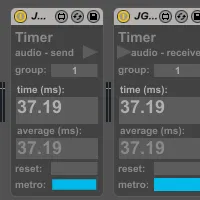
This is a set of 4 devices that allow you to check latency across your live set. The devices communicate with each other to determine how long it takes for a MIDI or Audio pulse to travel from one to the next, there are 2 send devices (1 for MIDI, 1 for audio) and 2 receive devices (1 for MIDI, 1 for audio).
The send device sends a signal and the receive device reports how much time it took for the signal to arrive, they will both display the result and with several pulses they’ll show an average of all the results so far. You can use several pairs of devices across your set by assigning each pair a unique group number, also instead of using the in-built metronomes you can send your own MIDI or audio streams through. Any audio needs to start and return to complete silence for the audio timers to register properly.
You can have send and receive devices on different tracks and you can time the latency between a MIDI send and an audio receive if you have an instrument in between.