- Type
- MIDI Effect
- Author
- IcaroFerre
- Version
- 81.1
- License
- Attribution
- Live version
- 9.1.6
- Max version
- 6.1.9
- Downloads
- 6,249
- Updated
- 2014-12-08
Spektro PS- is a MIDI Effect for Ableton Live by IcaroFerre, distributed as Creative Commons Attribution. It targets Live 9.1.6 and Max 6.1.9. On maxforlive.com it has 6,249 downloads. First published 2014-11-27, last updated 2014-12-08. 12 user comments below.
New to Max for Live? Read what MIDI Effects do, what the Attribution license means, how to install a device.
Description
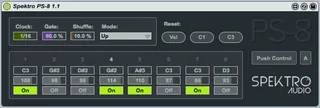
8-step analog-style sequencer for the Ableton Push inspired by analog sequencers such as the Korg SQ-10 and Moog 960 Sequential Controller.
PS-8 is great for live performance and improvisation.
The main difference between PS-8 and other Push sequencers is that it uses the Push encoders to change the pitch / velocity of the eight steps and rows of pads to control other parameters such as gate length, shuffle amount and direction.
Video demo: http://youtu.be/ajxvSvpdF0M
Since PS-8 uses custom controls for the Push, you must activate the Push Control button after loading the device. While active, Push Control will overwrite some of the Push controls / functions.
You can turn Push Control off at anytime by clicking on the Exit red button available on the top-left corner of the grid (Select button #1).
By default, the eight encoders control the pitch of the steps. In order to use the encoders to control the velocity of the steps, hold down the orange button available on the top-right corner of the grid (Select button #8). This is a momentary switch so you must keep holding the button down while changing the velocity of the steps.
Whenever you touch one of the encoders, the respective control on the main GUI will light up in order to provide visual feedback.
The first row of pads (green) lets you switch steps on and off.
The 2nd row (also green) displays the position of the step sequencer. You can also click on any of the pads in this row to jump to a specific position.
Rows 5 (purple), 6 (orange) and 7 (light blue) control gate length, shuffle amount, and mode respectively.
The speed / rate of the clock can be controlled using the Push Scene / Grid buttons.
Current limitations:
- The pitch, velocity and state of the steps can only be controlled using the Push.
- Since PS-8 was designed to be used for live performance, the pitch and velocity of all the steps will be set to C3 / 100 whenever the device gets loaded (meaning you won't be able to store sequences within projects). It's possible, however, to record MIDI sequences by routing the output of the PS-8 to a different MIDI track.
- The 2nd row (green) can only be used to jump to different positions when the sequencer is set to Mode 1 (Up) or 2 (Down).
PS-8 is developed by Spektro Audio.
Check out our MaxforLive devices at http://spektroaudio.com/projects
PS-8 uses modified / adapted parts from the Ableton Push Development Kit originally developed by Florian Zand.
---
Changelog:
1.1:
- New Push Control modes: In A (Auto) mode, you can activate Push Control using the Push In and Out buttons while the device is selected. M (Manual) mode lets you manually control Push Control using the button (like the previous version). I believe this will vastly improve the PS-8 workflow. Let me know if you find any bugs.
1.0:
- Initial Release
Comments (12)
Great work, us push users need more stuff like this.... Thanks
i like the concept. I hope you're going to expand on this somehow. Make it 32 (or even 64) steps and add a row for cc/parameter control and this is a monster sequencer. I would pay for it!
Add presets that start playing in legato or not (for example using the shift button when you want legato) and you are my new God!
I know nothing about max-programming so I hope you're listening.
Cheers!
Thank for your work!!
Works i n Manual...Any idea? This patch is great, I miss being able to use it on stage because of that
Now we just need a way to bank for more steps. This tool is invaluable besides this one feature!