- Type
- Audio Effect
- Author
- cooptrol
- Version
- 1.0
- License
- None
- Live version
- 8.1.3
- Max version
- 8.1.5
- Downloads
- 3,904
- Updated
- 2023-04-13
SurroGate is an Audio Effect for Ableton Live by cooptrol, distributed as freeware, with no license specified by the author. It targets Live 8.1.3 and Max 8.1.5. On maxforlive.com it has 3,904 downloads. First published 2010-07-04, last updated 2023-04-13. 8 user comments below.
New to Max for Live? Read what Audio Effects do, how device licenses work, how to install a device.
Description
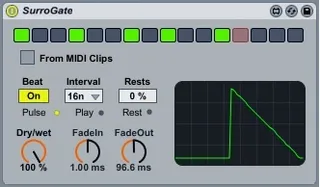
SurroGate is a sequenced audio gate, based on Ableton's M4L building block "CutHacker". I just added a 16 step sequencer. Also you can sequence the gate using Live's MIDI Clips. To do this you need to download my other device called SurroGateSender. It's a basic patch that you place on the MIDI channel where you have your Clips, and it sends Note On messages to the SurroGate you have on your audio channel. Search for it in the library.
April 2023: Corrected some UI bugs
Comments (8)
But yeah, it is an audio source, not MIDI. So cool still.
Thanks for sharing it on here.
I made the fade out dial midi-automatable so I can draw curves in a clip, that's funky. It's easy: select dial, and in Inspector put modulation mode in Additive.
Best,
AB