- Type
- MIDI Effect
- Author
- cooptrol
- Version
- 2.0
- License
- None
- Live version
- 8.1.3
- Downloads
- 8,451
- Updated
- No Updates
ParSeqII is a MIDI Effect for Ableton Live by cooptrol, distributed as freeware, with no license specified by the author. It targets Live 8.1.3. On maxforlive.com it has 8,451 downloads. Published 2010-08-19. 14 user comments below.
New to Max for Live? Read what MIDI Effects do, how device licenses work, how to install a device.
Description
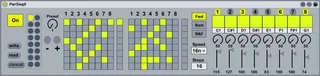
ParSeqII is the new and improved version of my previously posted ParSeq. It is a simple 16 step sequencer built with the Launchpad in mind, but that can be easily used with any other grid controller. You simply have to assign the buttons on your controller to the buttons on ParSeqII via midi mapping, including the step indicator rows to the right, which on the Launchpad are to be assigned to the scene launch buttons. The idea is to have steps 1-8 to User1 and 9-16 to User2 on the Launchpad (or two pages on your controller).
There is a simple midi mixer to the right, with channel on/off, note, duration, and volume selectors. You can store up to 16 preset sequences (the presets do not affect the mixer or sequencer parameters). There is also a preset knob selector and - & + buttons to navigate the presets. All these are very useful when assigned to hardware midi controllers and buttons. To store the presets Shift+Click on the small grey buttons. To save your preset set, press "Write" and save to an external file. Open it later pressing "Read".
I have also made another module called ParSeqRecieve (look for it in the library) which can be placed on other midi channels in Live to receive Note On messages from each ParSeqII channel.
A more efficient way to use ParSeqII is to put instruments on other tracks and set their input to receive midi from the channel where the sequencer is at. Then you have to use the "Pitch" Live Midi Effect to filter out all the notes except the one of the corresponding track of the sequencer. Either way, it is fun to place midi clips with note sequences and/or transpose envelopes on the tracks and launch them at the same time. All midi data gets through and the results are interesting. You can even do note sequences longer than the 16 steps of ParSeqII.
Comments (14)
Suggestions for improvements are welcome!
really like the patch!! ...but
-is it possible to do a fix mapping 4 da launchpad on user 1 button....
-32steps, 32 rows....
-navigate (better scoll like soyuz) throu note matrix with arrow buttons ...
-the round buttons on the right side 2 switch 2 different pages 4 patterns, channel on and off, note matrix, volume, duration, direction, speed, playhead and steps of the pattern... hehe...
this would be really really great !!!
really like the patch!! ...but
-is it possible to do a fix mapping 4 da launchpad on user 1 button....
-32steps, 32 rows....
-navigate (better scoll like soyuz) throu note matrix with arrow buttons ...
-the round buttons on the right side 2 switch 2 different pages 4 patterns, channel on and off, note matrix, volume, duration, direction, speed, playhead and steps of the pattern... hehe...
this would be really really great !!!
I made this seq with the idea of using the basic Launchpad python script in Live.
loving the seq tho!
Do anyone knows which melodic and drum sequencers work in Live 9?