- Type
- MIDI Effect
- Author
- dric
- Version
- 2.3
- License
- Attribution
- Live version
- 8.1.5
- Max version
- 5.1.8
- Downloads
- 946
- Updated
- 2012-02-25
MiNi KoRE is a MIDI Effect for Ableton Live by dric, distributed as Creative Commons Attribution. It targets Live 8.1.5 and Max 5.1.8. On maxforlive.com it has 946 downloads. First published 2010-08-09, last updated 2012-02-25. 1 user comment below.
New to Max for Live? Read what MIDI Effects do, what the Attribution license means, how to install a device.
Description
MiniKore 1.1
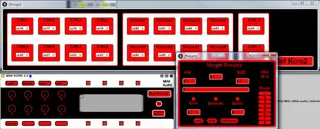
Insert before kore or any instrument\Track midi, double click on "CC" for assigned the controleurs. (By default it is assigned for Kore2)
The parameters of automation is rename properly and in the order.(Good for Apc40 and its pages of parameters)
The slider X Y not move after record automation but the parameters is realy automated.
The Buttons and toggle are saved whith set or preset Live, but the Labels is not save in the set.
Save Labels whith the preset on your HDD.
MiniKore 2
Now morphing preset 's possible
double Click on the "preset morph" create your presets and write for save on HHD.
Whith the slider, morph your presets, (maximum 8 preset) define with box "from" and "to" the preset for morphing.
2.3 You can automated morphing in live.
Sorry for my english :)
Comments (1)