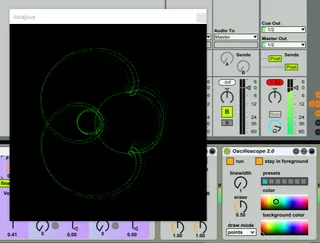
- Type
- Audio Effect
- Author
- sternmull
- Version
- 2.0
- License
- AttributionNonCommercialShareAlike
- Live version
- 9.1.8
- Max version
- 7.2.4
- Downloads
- 7,825
- Updated
- 2017-06-29
Oscilloscope is an Audio Effect for Ableton Live by sternmull, distributed as Creative Commons Attribution-NonCommercial-ShareAlike. It targets Live 9.1.8 and Max 7.2.4. On maxforlive.com it has 7,825 downloads. First published 2016-08-14, last updated 2017-06-29. 9 user comments below.
New to Max for Live? Read what Audio Effects do, what the AttributionNonCommercialShareAlike license means, how to install a device.
Description
A lissajous oscilloscope.
Based on a Max patch I found, but forgot where. Credits to the unknown creator!
For a more analog feel try this one (seperate program, not in Max): http://asdfg.me/osci
Comments (9)
I have two instruments (channels) in Instrument Rack, but have no idea how to redirect them to "left in" and "right in" inputs.
Thanks for your work :)
@ Beaches077: you need to use stereo sound to see the glorious graphics.