Voodoohop Live Tools - Harmonic and Tempo mixing
Ableton Live Harmonic mixing and tempo addons -----------...
- Type
- Audio Effect
- Author
- voodoohop
- Version
- 1.03
- License
- None
- Live version
- 10.0.5
- Max version
- 8.0.2
- Downloads
- 2,527
- Updated
- 2018-12-21
Voodoohop Live Tools - Harmonic and Tempo mixing is an Audio Effect for Ableton Live by voodoohop, distributed as freeware, with no license specified by the author. It targets Live 10.0.5 and Max 8.0.2. On maxforlive.com it has 2,527 downloads. First published 2016-08-24, last updated 2018-12-21. 25 user comments below.
New to Max for Live? Read what Audio Effects do, how device licenses work, how to install a device.
Description
Ableton Live Harmonic mixing and tempo addons
------------------
Important! you need to follow the link to download the application. the device i uploaded here won't do anything by itself.
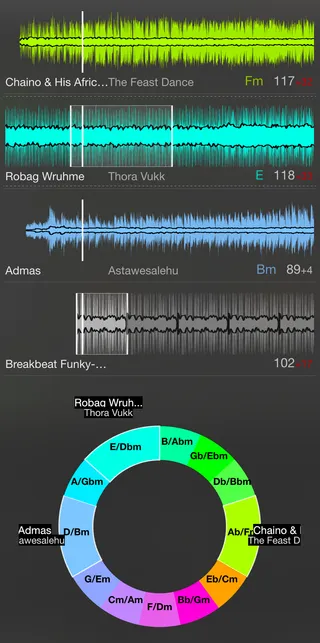
- shows the waveforms of tracks playing in a convenient floating window
- reads the warp markers of the audio files and shows the properly warped waveform with the aligned playing positions
- if you have a software like mixed in key or the free keyfinder it will read the key tags and color the waveforms accordingly
- transposing the clips in live will change the color of the waveform allowing you to quickly match the audio harmonically
- harmonic wheel showing relationship between playing songs and how pitching them will change their harmony
- choose between different key notations (camelot, open key and traditional)
- midi-mappable zoom of the waveforms
- apart from the tracks that are currently playing it will also show the waveform and harmony of the clip currently selected in live's detail view
- can update the color and name of the selected clip inside the live set, reflecting its harmony
- the waveform display contains an inner waveform which visualizes the low end portion of the audio
and more which i forgot...
-------------------------------
Instructions:
https://medium.com/@thomashaferlach/voodoohop-harmony-and-tempo-tools-for-ableton-live-5eb8af96cb41
The Max for Live device is meant to be put on each track in your Live set you want to monitor. It sends the information about the currently playing clip to the Voodoohop Live Tools application which then analyses the metadata etc.
Sorry about the file size. I will reduce it at some point.
To hide and show the window from anywhere you can press Ctrl-Shift-V.
In order for the program to read the warp markers correctly you need to hit the little "save" button on the clip's detail view.
Download:
--------------
https://medium.com/@thomashaferlach/voodoohop-harmony-and-tempo-tools-for-ableton-live-5eb8af96cb41
--------------
Please give me feedback.
If you are interested in participating in development send me a message. The application is written with node.js and react. A small Max for Live device sends the data from the live set to the application.
Thanks to the feedback from a bunch of you and some spare time i managed to improve the Voodoohop Live Tools.
contact: [email protected]
Comments (25)
Use that device instead of the zipped version and let me know if it works now.
I have just updated it.
As of right now its hit or miss. sometimes it will pull up the information of the file. and sometimes it wont. is there a way you could add a "refresh" or "reanalyze" button to the app?
I've been slowly fixing some bugs related to the analysis of some file formats, special characters in filenames, performance and more.
the application should let you automatically update when you start it and there is a new version available.
curtified: i'm trying to keep the interface as minimal as possible so i haven't added a reanalyse butten yet. in theory it should recognise based on the file's modified dates whether it needs to reanalyze the audio.
if the problems persist i could easily add a reanalyze button though. let me know through here or write an email to [email protected]
With download device button I only get Voodoohop Live Tools Master device. Where can I get device for every track?
And with your link in description I can download popup application which will detect key transitions and so on, am I right?
Or maybe I have other problem?
Please help me
Thanks
Chriss
Youve made mention of the file size since your first release. It never bothered me but for the question as to what is causing the size. Are there a lot of libraries, graphic files, or code to clean up?
If we remove Electron and use the browser already installed on the system to display the window we could reduce the size to a couple of megabytes. Will take a few months though before I can get around to it.
I've been editing app.asar to increase the overall window size of the waveforms.
Originally set to 300 pixels, I upped it to 700 and get a nice big waveform.
code:
case 2:
windowOpts = {
width: 700,
Is there any chance you will make this window re-sizable by dragging corners? I'd love to get bigger waveforms without editing stuff :)
Would be amazing if someone could get the Interface, either just the Waveforms or the whole thing, to display in the Push 2 Screen. That would be epic! Might be getting greedy ;)