Quick Transpose BW
So what is it? It's a completely over-the-top transposer, w...
- Type
- MIDI Effect
- Author
- synthesizerwriter
- Version
- 0.03
- License
- None
- Live version
- 10.0.5
- Max version
- 8.0.0
- Downloads
- 593
- Updated
- 2018-11-18
Quick Transpose BW is a MIDI Effect for Ableton Live by synthesizerwriter, distributed as freeware, with no license specified by the author. It targets Live 10.0.5 and Max 8.0.0. On maxforlive.com it has 593 downloads. First published 2018-10-31, last updated 2018-11-18. 2 user comments below.
New to Max for Live? Read what MIDI Effects do, how device licenses work, how to install a device.
Description
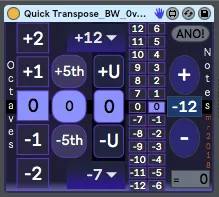
So what is it? It's a completely over-the-top transposer, with many ways to transpose, including a counter mode that you may well have never seen before and will likely never see again. Like many of my devices, it is a bit of an experiment (ProbablyLFO and LFOLFO are good examples). Enjoy!
Just imagine the plain ordinary 'Quick Transpose', but turn up the transposition options to 11! So you get:
- Octaves
- Fifths
- User-selectable
- Semitones
- Counter mode (up and down (loops at +/- 12 semitones)
All transpositions can be accessed using my 'mouse-user centric' preference: a single mouse click.
Like any simple MIDI 'transpose', device, you may get stuck notes if you transpose whilst a note is playing (the Note Off message tries to turn off the untransposed Note On!). I use two different methods to try and fix this, but they aren't 100% effective in all cases. I use this for transposing layers in Racks, and so this problem doesn't occur. If you really want to do real-time transposition, then try my 'Quick Transpose Audio BW' device, which does the transposition in the audio-domain, and has extra features designed for live performance (plus a different set of glitches and artefacts!)
And grateful thanks to 'brucewayne247' for the inspiration for the 'Counter' section... This latest version adds a quick 'zero' function when you click on the blue transpose value in between the + and - buttons.
Comments (2)