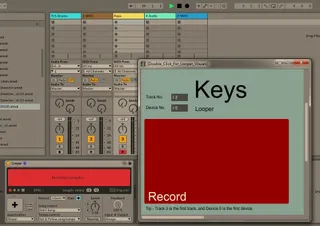
Live Looper Visuals - Large screen looper state
Device to show Ableton Live's built in looper device in a p...
- Type
- MIDI Effect
- Author
- sharp
- Version
- 1.0
- License
- None
- Live version
- 10.0.1
- Max version
- 7.3.5
- Downloads
- 965
- Updated
- No Updates
Live Looper Visuals - Large screen looper state is a MIDI Effect for Ableton Live by sharp, distributed as freeware, with no license specified by the author. It targets Live 10.0.1 and Max 7.3.5. On maxforlive.com it has 965 downloads. Published 2019-06-09. 20 user comments below.
New to Max for Live? Read what MIDI Effects do, how device licenses work, how to install a device.
Description
Device to show Ableton Live's built in looper device in a pop-up free floating window.
Useful for perofmring and you need to view the status of the looper (record, play, overdub, stopped) from a distance.
Place on a MIDI track.
Let me know if there's anything issues
Comments (20)
Experimenting on this for use live with an international touring artist. Results to follow!
@ jordantanner - shout if you want any updates
Are there any other looper tools you find useful (not just mine, I mean), I still do some looping with live.
Because I use multiple loopers at the same time, I use Bome Midi Translator Pro to convert 1 midi signal into multiple ones so that I can start/stop/rec multiple loopers with one push of a button. But when I start multiple loopers at the same time (via the small play button, not the multi-purpose (big) button), the visual feedback turns green, even when there is no audio recorded. When I press record on a particular looper it turns red and start recording/looping, so the logic works correctly, it just shows that all loopers are playing while they're clearly not all playing.
I hope this make any sense to you, because it's quite a complex setup :) do you know how this can be fixed? Thanks in advance!
So yes, it’s possible but I won’t have time to update the device to make it work for racks due to other (paid) projects.
If it is critical we can discuss a paid option of the device to support racks.
Did you try different numbers in the track number box
Maybe the return tracks are 2 tracks after the last track
Track 1 audio
Track 2 audio
Track 3 midi
Travk 4 midi
Track 5 is the return
Maybe that works, I haven't looked at this in a long time unfortunately.
is there any chance to make it send midi messages — or even better, trigger selected midi clips for every state (hopefully without changing active scene)?
here's what I'm thinking of — I use launchpads as a grid-displays, giving me more flexibility than just a screen while playing live — it would be perfect to trigger a clip for every state (the perfect world scenario — as well as the active beat / number of beats in the looper, making it possible to re-create the whole thing on external grid)
what do you think? :)
Do you think the same concept can Be adapted to show the selected instrument in an instrument rack?
I am very sure the device could be adapted to show current selected instrument in a rack.
However I don't have any time for M4L development at the moment unfortunately.
There are some other devices 'M4L Live API navigator' (from memory), they generally show what is selected.
Ableton Live isn't really that well set up for live performance in my experience, not like hardware guitar pedals/loopers or live performance keyboards,