Note Follower
Key tracking device Note Follower 3.1 converts incomi...
- Type
- MIDI Effect
- Author
- zaSLON
- Version
- 3.1
- License
- Commercial
- Live version
- 9
- Max version
- 8
- Downloads
- 0
- Updated
- 2024-09-28
Note Follower is a MIDI Effect for Ableton Live by zaSLON, distributed as a commercial (paid) device. It targets Live 9 and Max 8. First published 2019-06-27, last updated 2024-09-28. 7 user comments below.
New to Max for Live? Read what MIDI Effects do, what the Commercial license means, how to install a device.
Description
Key tracking device
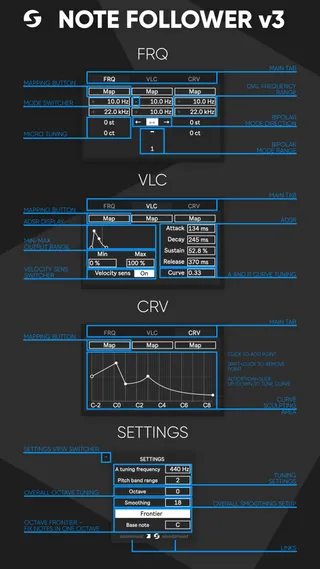
Note Follower 3.1 converts incoming notes into frequency automation and lets you map that automation to any device, even a VST plugins. You are able to set the boundaries of the filter frequencies so that it coincides with the boundaries of the device. Also, you can shift octave or smooth automation. Pitch bend is also could change the automation (choose the PB value of your synth). Version 2 now supports negative values for the frequency range (use + switcher).
Tested:
Live 11
Live 10
Live 9 [with Max installed] (but slightly UI shifts)
Previous version overview:
https://youtu.be/6QKSTTm-gKk
Changelog:
v3.1
- Frequency range increased up to 40 kHz
v3.0
- Updated UI
- Separated Frequency map buttons
- Curve mapping added (CRV tab)
v2.6
- Velocity mapping added
v2.5
- Live 9 compatibility improvements
v.2.4
- Minor changes
v 2.3
- UI redesign
- Added "Note Frontier" that allows you to leave automation in one octave, also it's possible to set the Base note of the octave.
v 2.2
- Testing
v 2.1
- UI redesign
- Added negative values switcher for frequency rage
v 1.3
Bugfixes:
- Map button is resetting its state after Set reloading - fixed
- Automation jumps to the previous note when the current note send off - fixed
v 1.2
- Pitch bend support added
- Performance improvements
v 1.1
- The first public release
Comments (7)
I just bought the new version and it's great! The new features add a lot, I've been wanting something like this for a long time now.
Also, here's a handy little trick to use the smooth control as a "pitch envelope"
https://imgur.com/DN3nc3m
* 'midi through' chain is empty, allowing midi to go to instruments that may be on the channel
* 'note follower' chain is off, so it doesn't interfere with "midi through'
* the 'fake pitch envelope' sub-rack contains Ableton's Pitch midi effect, and a simple midi delay, found here - http://maxforlive.com/library/device/1577/delay
* place Note Follower device inside the main rack, but after 'fake pitch envelope' sub-rack
* by offsetting the pitch and delay time, the pitched note will hit first, followed by the delayed note.
* As Note Follower triggers based on last note priority, the smooth parameter will create a contour between them, i.e. fake pitch envelope
Is it possible to choose a frequency on audio track and follow it?