Polyphonic Latch
This free device polyphonically latches midi. The midi you p...
- Type
- MIDI Effect
- Author
- stev
- Version
- 1.0
- License
- AttributionNonCommercialShareAlike
- Live version
- 10.0.1
- Max version
- 8.0.3
- Downloads
- 1
- Updated
- 2019-09-19
Polyphonic Latch is a MIDI Effect for Ableton Live by stev, distributed as Creative Commons Attribution-NonCommercial-ShareAlike. It targets Live 10.0.1 and Max 8.0.3. On maxforlive.com it has 1 downloads. Published 2019-09-19. 1 user comment below.
New to Max for Live? Read what MIDI Effects do, what the AttributionNonCommercialShareAlike license means, how to install a device.
Description
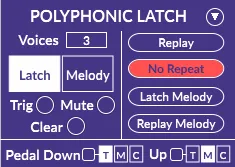
This free device polyphonically latches midi. The midi you play into it will hold until you play more notes than the amount of voices selected (up to 8 voices). It will then drop the earliest played note to accommodate new notes. I've found this device is a great way to come up with chords you wouldn't normally play by creating chords out of melodies.
Switch between sending notes into this polyphonic latching system and playing a melody over the latched notes. Latch the melody separately for yet another held note.
There are buttons to re-trigger, mute, and clear latched notes. These functions can also be accessed with the sustain pedal (change settings for pedal up and down separately).
Other Settings:
A “Replay” toggle that makes it so every new note played replays the previously latched notes.
The “No Repeat” toggle which decides if this device should override latched notes with repeated notes, or keep them stored.
The “Replay Melody” toggle that replays the held melody note whenever new polyphonically latched chords are held.
Unfold the keyboard section to view latched notes, melody notes, and stored notes on a color coated keyboard.
Detailed info text for every parameter.
There's a demo of an unfinished version on the site. It's just missing the sustain pedal functionality and some last minute UI tweaks.
-Heaps of Bleeps
Comments (1)