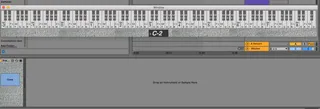
PianoRoll 128 Keys Floating Window
Very simpel device, it is a floating window that displays th...
- Type
- MIDI Effect
- Author
- Dorra4000
- Version
- 1.0
- License
- None
- Live version
- 10.0.1
- Max version
- 8.0.6
- Downloads
- 821
- Updated
- 2019-09-30
PianoRoll 128 Keys Floating Window is a MIDI Effect for Ableton Live by Dorra4000, distributed as freeware, with no license specified by the author. It targets Live 10.0.1 and Max 8.0.6. On maxforlive.com it has 821 downloads. First published 2019-09-28, last updated 2019-09-30. 9 user comments below.
New to Max for Live? Read what MIDI Effects do, how device licenses work, how to install a device.
Description
Very simpel device, it is a floating window that displays the keys you are playing, i got myself a push 2 and needed something to help me understand the layout.
It is also a great template for you, if you want to make your own floating devices:
1. Open the "p window"
2. Copy the objects and arguments
3. create new patcher, creat "p window"
4. Paste and design your window, paste the rest, first time you lock and save will be the size of the window.
Note: the window will not close until you press close, very handy :)
Comments (9)
And chord detector!! why did i not think of that! i am on it.
and pleas do explain what you mean by note view :)
2) Here is notation but without push scale selection integration and without chords detection.
http://maxforlive.com/library/device/4799/fpb-pop-up-piano
3) HarmoDisplayGuitar J74, unfortunately, didn't detect chords and haven't notation. http://maxforlive.com/library/device/1177/j74-harmotools
I think these factors will be very useful for this device:
1. Floating screen
(optional big one-octave mode with big octave number sign).
2. Chord detection with big font size.
3. With note view above with big size.
Optional:
4. Guitar view like in HarmoDisplayGuitar J74
It seems to need some sort of collaboration to make an exhaustive one.*)
Have a nice day!
I love max, but it is also a big black hole, so whenever i can copy and paste, i will do it. more time for music.
If the text is to small for you, you can edit it this way:
Open device in max
double click "p window"
unlock the patcher
click on text to be scaled
click on view, then on "open inspector window"
change font size :)
shift click to sellect more than 1 text box.
remember to lock and save :)