Midi Fighter 3D Bank Control
This utility allows you to use the rubber buttons on the sid...
- Type
- MIDI Effect
- Author
- offchristianamr
- Version
- 1.1
- License
- None
- Live version
- 10.0.1
- Max version
- 7.3.5
- Downloads
- 119
- Updated
- 2020-10-16
Midi Fighter 3D Bank Control is a MIDI Effect for Ableton Live by offchristianamr, distributed as freeware, with no license specified by the author. It targets Live 10.0.1 and Max 7.3.5. On maxforlive.com it has 119 downloads. First published 2019-09-27, last updated 2020-10-16.
New to Max for Live? Read what MIDI Effects do, how device licenses work, how to install a device.
Description
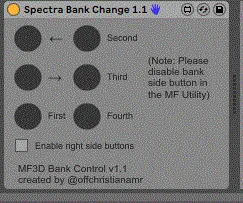
This utility allows you to use the rubber buttons on the side of the Midi Fighter 3D to change banks, similar to the Midi Fighter Spectra.
To use, set the track monitoring to in and make the MIDI output to the Midi Fighter 3D on channel 4. Also remember to disable "Bank Side Button" in the Midi Fighter Utility.
The top button on the left switches the bank forward and the middle left button switches the bank back. The bottom left switches to the first bank, and the buttons and the right side switch to the second, third, and fourth banks as long as the "Enable right side buttons" switch is toggled.
Unfortunately, the Midi Fighter 3D firmware does not allow the lights to update fast enough to recreate the animation used on the Spectra.
IMPORTANT NOTE: After loading the Max For Live device into your set, press one of the bank buttons on the Midi Fighter. The device will not work unless you do this. Hopefully I can find a fix for this soon.
Enjoy!