OP-Z CTRL
OP-Z CTRL 1.0 is a midi max for live device to control the O...
- Type
- MIDI Effect
- Author
- pauk
- Version
- 1.01.0
- License
- Commercial
- Live version
- 10.0.1
- Max version
- 7.3.5
- Downloads
- 0
- Updated
- 2019-10-04
OP-Z CTRL is a MIDI Effect for Ableton Live by pauk, distributed as a commercial (paid) device. It targets Live 10.0.1 and Max 7.3.5. Published 2019-10-04. 4 user comments below.
New to Max for Live? Read what MIDI Effects do, what the Commercial license means, how to install a device.
Description
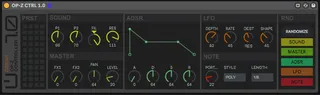
OP-Z CTRL 1.0 is a midi max for live device to control the OP-Z.
The UI is divided in the main sections of the hardware, Sound, ADSR, LFO, Note and Master.
There is a Preset storage section where you can save up to 44 presets within the Live project.
And finally there is a Randomize section where you can define where the randomization affect by sections: Sound, master, ADSR, LFO and Note.
You can use one device per voice. Be sure to put the device in a MIDI channel and configure the MIDI Output to route the desired OP-Z voice.
Don't hesitate to contact me if you find any problem or if you have an idea to update the device :)
Comments (4)
Thank you for the good job but I have to admit that I'm a bit disappointed not to find banks control for ableton push 2. It would be very handy. I hope you will improve it.
Cheers
One question. I cannot figure out how to assign the presets. Sorry if I'm being dense, but would be super helpful to understand how to use this. Thanks!