Metric Modulator
Metric Modulator automatically creates metric modulations ba...
- Type
- MIDI Effect
- Author
- dennisdesantis
- Version
- 1.2
- License
- None
- Live version
- 11.0.12
- Max version
- 8.1.11
- Downloads
- 867
- Updated
- 2022-01-25
Metric Modulator is a MIDI Effect for Ableton Live by dennisdesantis, distributed as freeware, with no license specified by the author. It targets Live 11.0.12 and Max 8.1.11. On maxforlive.com it has 867 downloads. First published 2020-02-17, last updated 2022-01-25.
New to Max for Live? Read what MIDI Effects do, how device licenses work, how to install a device.
Description
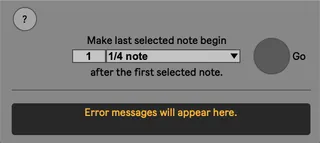
Metric Modulator automatically creates metric modulations based on a selected span of notes.
To use:
- Make a selection of notes in a Session View clip
- Using the choosers, select an amount of musical time into which the selected notes should fit
- Click Go
Metric Modulator will then:
- Duplicate the current scene
- Adjust the note start times and durations so that the last selected note will be placed after the first selected note by the chosen amount of musical time
- Name the scene with the tempo necessary to preserve the sound of the original clip
- Adjust clip and loop start and end markers to maintain their proportional relationship with the original clip
The result is similar to Live’s Note Stretch behavior, but in reverse. Notes get stretched, but a corresponding tempo change occurs which “cancels” the effect of the stretch. As a result, the clip sounds the same, but every other clip plays at a new tempo.
version 1.2: updated for Live 11. Notes in newly-created clips will share the parameters of their "parent" notes, including new parameters for Live 11 (velocity deviation, probability, and MPE parameters).
Dennis DeSantis
January 25, 2022
Known issues:
- Start and end markers can't be closer together than a 16th note. If a metric modulation would require them to be, the resulting clip may sound different than the original clip.
- Clip envelopes will not be adjusted in the duplicated clip. This means their relationship to the notes may be different.