- Type
- Audio Effect
- Author
- flowstate
- Version
- 1.1
- License
- Commercial
- Live version
- 10.1.18
- Max version
- 8.1.5
- Downloads
- 0
- Updated
- 2024-01-15
MIDI Morph is an Audio Effect for Ableton Live by flowstate, distributed as a commercial (paid) device. It targets Live 10.1.18 and Max 8.1.5. First published 2020-10-01, last updated 2024-01-15. 4 user comments below.
New to Max for Live? Read what Audio Effects do, what the Commercial license means, how to install a device.
Description
***DEPRECATED***
With the release of Live 12 and the new MIDI Features this device is now deprecated and will no longer be receiving any support. It still continues to function for Live 10 and will be left here for people to use. As such it will now be available for free.
***DEPRECATED***
Live's MIDI Effects are great, but sometimes it's nice to be able to affect the MIDI directly in the piano roll, being able to see what's going on visually can really help.
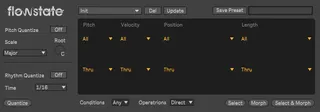
MIDI Morph allows you to transform and morph notes in the piano roll of the selected clip in multiple ways.
You can filter the MIDI to be affected by Pitch, Velocity, Position and Length. Then morph their values by Fixing, Adding, Subtracting, Multiplying, Dividing, Randomizing and Random (+/-) them. More will be getting added soon, feel free to drop suggestions in the comments.
The device comes with 6 in built presets, as well as a blank preset so that you can make your own. Custom presets can be very easily saved and recalled later inside a live .adv file, so there's no need to set them up each time.
Release Notes:
V1.1:
Added Pitch/Rhythmic Quantization
Added Select, Morph & Select & Morph buttons
Added Global Conditions and Operations Rules
Improved pitch operation (Add, Sub, Mult & Div now uses Integers instead of MIDI Notes.)
Comments (4)
Hmmm have you thought about a "wilder" version of this that can add glitch effects, like stutters and fills and other more "erratic" data? I've used various M4L MIDI tools in this vein, and I adore Chance Ten ( https://isotonikstudios.com/product/chance-ten-probability-based-inspiration/ )... but none of them output directly to piano roll, so I have to go through laborious workarounds.
Let me know if I should reach out via email.
Yeah, these kind of ideas are definitely on the cards - this device is designed to handle the basic piano roll functionality that is missing for the moment, but there is potential to include things like glitches, ratchets, stutters, fills, crescendo, glissando and so on.
Definitely reach out over email using the email in the receipt/manual and I will add you to the beta list for this device.
I love this tool, it's finally brought back features I've been missing from Logic for 10 years.
One issue I've noticed is that if you assign a shortcut to any of the parameters (eg. 'morph') you have to hit the key twice for it to work.
I've also noticed this issue when playing with M4L myself.
Thanks, Pat.
I've also noticed that when editing clips in the arrange (Move, copy, delete, split etc) while MIDI Morph is loaded you have to undo twice, no other processes in Live are effected.
I've emailed you with this problem too....
P.